Product information
What is the THINKTOOL Reader 8 used for?
The THINKTOOL Reader 8 is a diagnostic device with a screen that scans the electronic systems of supported passenger vehicles, reads and clears fault codes, and displays live data. Vehicle communication is established via an OBD cable; Wi-Fi is used for software updates. CAN FD support is beneficial for diagnostic communication with compatible new-generation vehicles.
The manufacturer specifies full system diagnostics, maintenance resets, and supported active tests. It is not assumed that every function will be available on every vehicle or that this compact device will replace a professional ECU software installation system. Selection is made based on the workshop's vehicle fleet and daily operations; the number in the model name is not proof of superior coverage.
Vehicle Coverage
What vehicles does the THINKTOOL Reader 8 support?
The make name alone does not guarantee compatibility. Within the same make, model year, engine, chassis, control unit, communication protocol, and intended operation can yield different support results.
- Vehicle Group
- Passenger cars and light commercial vehicles included in the product software
- Supported makes
- Multi-brand coverage; the current make list is obtained from the manufacturer's official vehicle or protocol database.
- Supported models
- Verified from the official coverage screen based on make, model, model year, engine or chassis, and control unit.
- Scope of service
- Code reading, live data, active test, service function, coding, and programming may be supported separately.
- Connection conditions
- Full system diagnostics, CAN FD, Maintenance functions, Wired OBD connection
- The make and model examples on the page do not guarantee all production years and all functions.
- Before any definitive operation, the manufacturer's current coverage record must be verified with the VIN or full vehicle information.
Open official sources and coverage connectionsProduct details
How does full system diagnostics differ from reading only engine codes?
General OBD operations mostly focus on emission-related engine data. Full system diagnostics, on the other hand, aims to access supported control units of the vehicle individually. The accessibility of systems such as transmission, brakes, airbags, or body electronics, in addition to the engine, depends on the vehicle and software coverage.
The presence of a brand in the device's menu does not mean that all modules will be accessible in all years of that brand. The correct vehicle is selected; modules that cannot be accessed as a result of the scan are also recorded.
The inability to connect to a module does not directly mean the module is faulty; vehicle power supply, network structure, socket, and access conditions must be investigated separately.
Product details
Reading a fault code is not the same as fixing the malfunction
A fault code indicates that the control unit has recorded a specific condition. The presence of a sensor in the code's name does not prove that the sensor must be replaced; cables, power supply, connections, or mechanical conditions can also lead to the same record.
With the Reader device, records are first read, the distinction between current and past states is examined, and necessary data is saved. Clearing the code is applied for control purposes after the repair. The warning light turning off immediately after clearing does not prove permanent repair. The problem may be recorded again when the vehicle's own monitoring cycle is completed.
The customer's complaint, the code status, and the physical checks performed are written separately in the work order.
Product details
Use live data to answer the correct question
Live data shows the measurements and calculated values reported by the control unit at that moment. Instead of opening numerous parameters simultaneously, the technician selects values related to the question being investigated. For example, in a temperature complaint, values before the engine warms up and after it has warmed up can be compared.
The presence of a value does not mean it is measured independently; some parameters are calculations by the control unit. Furthermore, different brands may display the same concept with different units or names. The expected value is obtained from the vehicle service documentation.
Looking at the data on the diagnostic screen does not lead to the conclusion that mechanical measurement, electrical measurement, or manufacturer-specific testing is unnecessary.
Product details
What does active test provide, and what does it not?
The manufacturer's current catalog lists the active test function on supported vehicles. In this operation, the device can send a command to operate a specific component to the appropriate control unit. Which component receives the command under which conditions depends on the vehicle's software.
Since fans, valves, or other moving parts may operate during the test, the service area is prepared, and the preconditions on the screen are followed. The ability to send a command does not mean the component is healthy across its entire operating range. Similarly, the absence of a test in the menu does not indicate that the component is faulty.
Users do not transfer the list of active tests seen for one brand to another brand or model year.
Product details
OBD cable for vehicle communication, Wi-Fi for updates
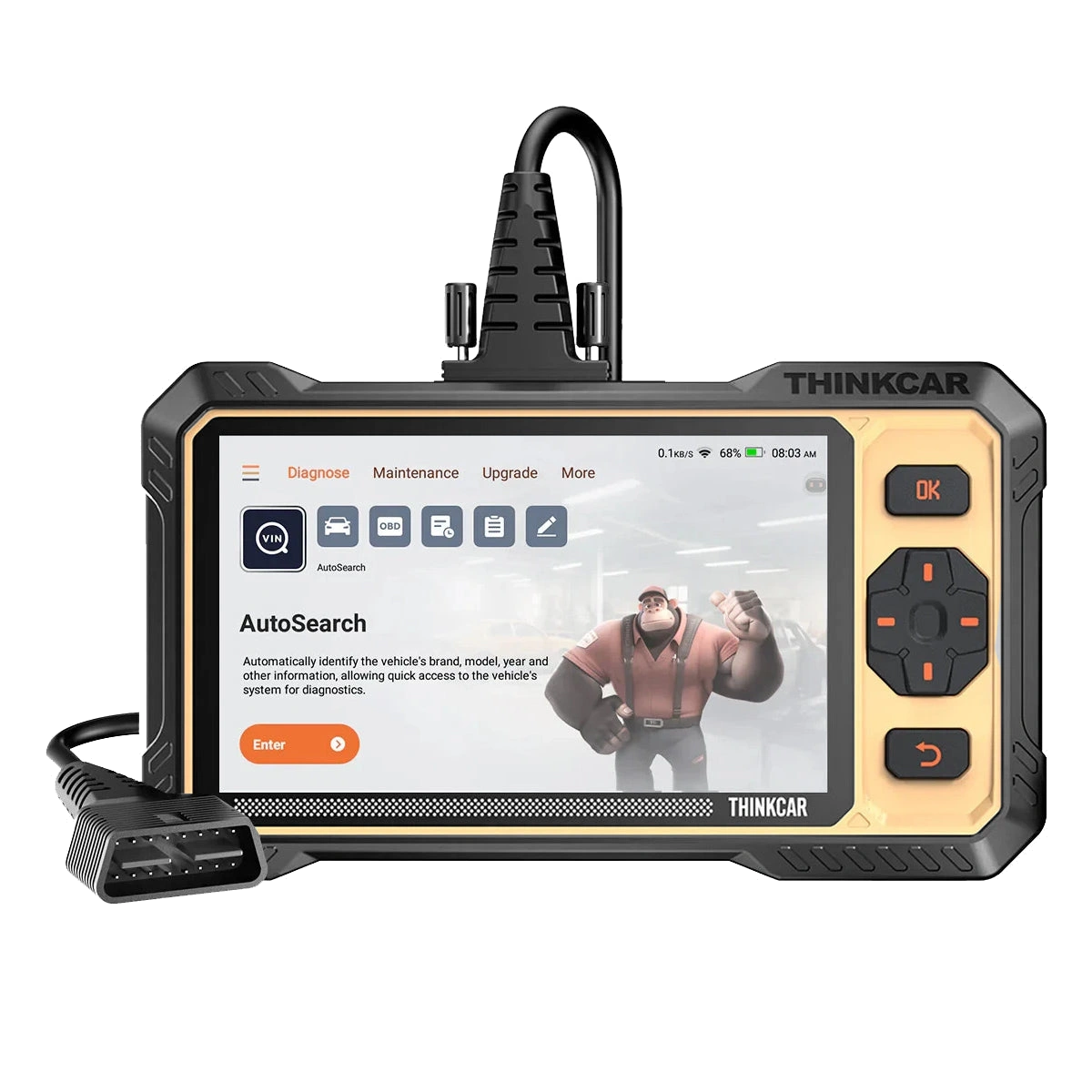
The actual product photos of this model show the OBD connection cable; diagnostic connection to the vehicle is wired. The presence of Wi-Fi does not mean vehicle communication is done via a wireless VCI. Cable routing is an important selection criterion in service work: the device must be kept near the vehicle, the socket must be accessible, and the cable must be routed away from moving parts.
Routes that could cause pinching around doors or pedals are not used. The OBD socket and pins are checked for physical damage. If a long-term operation is planned, the vehicle's electrical supply is assessed separately. Which operations will be affected if the internet connection is lost is understood based on the distinction between local diagnostic software and online update tasks.
Product details
The role of CAN FD support in the purchasing decision
CAN FD is one of the protocols used in diagnostic communication for relevant vehicles. The manufacturer clearly specifies CAN FD support for this model. However, protocol support and vehicle software coverage are not the same thing. The possibility of physical communication does not guarantee access to all modules or the performance of all special functions.
If a workshop is investing in a specific new-generation vehicle, the brand, model year, engine, and desired operation are checked together. Other items such as DoIP, J2534, or online programming are not added solely because CAN FD is present.
Reading the name of a protocol as a common label for all advanced diagnostics and coding capabilities can lead to incorrect product selection.
Product details
Maintenance resets depend on vehicle coverage
The manufacturer's US product page specifies 15 maintenance functions. Since the number of maintenance functions is shown differently under various headings in the current catalog, a fixed and complete menu commitment for all vehicles is not provided here.
A maintenance function is used to update the necessary information in the control unit or to run a supported service procedure after the relevant operation has been physically completed. Resetting the maintenance counter without performing an oil change or initiating an adaptation without completing mechanical repair is not proper service practice.
Preconditions on the vehicle, ignition status, and the on-screen procedure sequence are followed. It is considered that the same named maintenance menu may have different requirements on different vehicles.
Product details
Service scenario: initial scan at vehicle intake
When a vehicle arrives at the service, the customer's complaint, mileage, and the conditions under which warnings occurred are recorded. Supported systems are scanned by selecting the appropriate vehicle. Initial codes are saved before starting repairs; past faults are distinguished from current faults.
If there are low voltage records in multiple modules, they are not treated as individual component failures; a common power supply issue is investigated. The initial scan is the reference point for the operation. Clearing codes without taking the initial record makes it difficult to understand the conditions under which an intermittent problem occurred.
The purpose of the scan is not to automatically select the repair but to organize the technician's investigation.
Product details
Service scenario: intermittently illuminated engine light
An intermittent warning may not reappear at every service visit. The technician examines the current code, along with any freeze frame data and relevant live data. The relationship of the complaint to cold engine, hot engine, or load conditions is investigated. At the same time, data related to the fault is selected instead of unnecessary parameters and compared with the expected behavior in the vehicle documentation.
Clearing the code does not mean the problem has disappeared. If data observation is required on the road, driving safety is maintained; the driver does not interact with the device screen. Read values guide physical connection and measurement checks. The device showing a normal value in a test does not prove that an intermittent problem has been definitively resolved.
Product details
Service scenario: electronic step of completed maintenance
After scheduled maintenance on the vehicle is completed, it is checked whether the relevant reset or service function is supported for that vehicle. The correct maintenance menu is opened; preconditions on the screen and the vehicle manufacturer's procedure sequence are followed. The fact that the mechanical work has been done does not mean every adaptation is automatically required.
When the operation is complete, the instrument cluster, service record, and relevant module are checked again. If the operation fails, the same command is not repeated thoughtlessly; vehicle selection, electrical supply, and missing preconditions are investigated. The work order is separately recorded with which maintenance was physically performed and which electronic function was completed.
Thus, the maintenance reset is not presented as a substitute for the maintenance itself.
Product details
Service scenario: commanding a supported component
If a component is suspected of not working, it is first verified that the vehicle supports this active test. The work area is prepared to be clear of moving parts and hot surfaces. The technician applies the command under the necessary preconditions and observes the component's actual response.
The message on the screen indicating the command was accepted does not solely indicate that physical movement or correct current consumption occurred. If there is no response, connections, power supply, control signals, and mechanical binding are investigated. When the test is finished, the vehicle is returned to its normal operating state.
This approach helps narrow down the question before replacing parts; it does not reduce the entire diagnostic process to a single button.
Product details
Service scenario: checking the result after repair
Once the repair is complete, a second check is performed that can be compared to the initial scan. Codes for the relevant system, live data related to the complaint, and, if necessary, supported service functions are examined. Some monitoring results may require the vehicle to complete specific operating conditions; a short scan within the service area does not complete all of these.
The warning light being off at that moment does not claim the vehicle is fault-free under all conditions. The record provided to the customer specifies which checks were performed and which were not. Thus, the diagnostic information obtained from the device carries the trace of the actual repair and final check; it is not presented as a general vehicle health certificate on its own.
Product details
What does free lifetime update cover?
The manufacturer specifies free lifetime software updates for the Reader 8. This statement pertains to the device's diagnostic software; it does not imply that any other brand account, security gateway subscription, or third-party service fee is also free. No date guarantee is provided for when new vehicles or functions will be added.
During initial use, registration and software update steps are completed according to the device's instructions. Internet and power conditions must be maintained without interruption during updates. The right to updates and the hardware warranty are different concepts. The statement regarding software lifespan on the product page is not to be interpreted as a claim that the hardware will be replaced for free indefinitely.
Product details
Daily use with touchscreen and physical buttons
The body features physical direction, confirm, and back buttons in addition to the touchscreen. The screen provides access to system and maintenance menus; the physical buttons assist in navigating selected menus.
Since the screen size is listed differently on the manufacturer's regional pages, the size that could affect the purchasing decision is not presented here as a definitive regional package value. Actual product photos show the body layout. Protecting the device in the workshop, cleaning the screen, and storing the cable neatly are part of daily use.
The external appearance of the product does not serve as a certificate of waterproofing or drop resistance; uncertified durability classes are not included.
Product details
Do not interpret the coding heading as unlimited ECU programming
Although the coding heading is present in the current manufacturer catalog, this is not a commitment to online coding or installing new software on a control unit for all vehicles. Coding, adaptation, active test, and flash programming are different operations. The task to be performed after replacing a specific control unit is defined by the vehicle procedure.
If the workshop's primary need is ECU software installation, the device is not selected based solely on a general catalog indication; full vehicle, module, and operation support must be examined. The necessary manufacturer account, interface, and stable power supply are evaluated separately. Programming or license capabilities of other Thinktool devices are not copied to this model's page.
Product details
Distinction between the sold product and separate equipment
This product is a Reader 8 diagnostic device with a screen and its own wired vehicle connection. It is not a small Bluetooth dongle or wireless VCI package that requires a phone application. The Thinkcar key programmer, PROG module, battery power supply, oscilloscope, and EV battery service equipment are not considered included with this product itself.
An icon on the product's startup screen is not proof that a physical accessory is included in the box. Upon delivery, the device model, cable, and socket condition are checked; initial startup and account setup steps are performed according to the manual. The workshop that will use the product performs its initial verification with its own vehicle fleet before proceeding to daily operations.
Product details
Simple OBD reader, Reader, or professional tablet?
For users who only want to see engine codes related to emissions, a basic OBD reader may be sufficient. For a service requiring access to different supported vehicle systems, live data, and maintenance functions, the Reader class may be suitable.
Workshops requiring wireless operation, more comprehensive special functions, or specific programming needs should compare these operations with professional tablets that have proven capabilities in those areas. A larger screen or a higher model number does not alone mean broader vehicle coverage.
Features present in both devices are not presented as superior in a comparison table. The most useful criterion is whether the required task can actually be performed on the vehicles commonly encountered in the workshop.
Product details
What vehicle information is important for purchasing decisions?
Vehicle make alone is not sufficient detail. Model, production year, engine or powertrain option, control unit, and the intended operation are all part of the same coverage check. The electronic equipment of the same model may vary in different markets.
For vehicles with security gateways, additional access conditions may also apply; these conditions are not excluded from the device's general full system statement. The service can concretize the suitability check by listing its frequently encountered vehicles and the maintenance operations it requires.
The selection is made more accurately when the expected task is specified as only reading codes, live data, active tests, or a specific adaptation. The universal brand percentage does not replace this operation-based check.