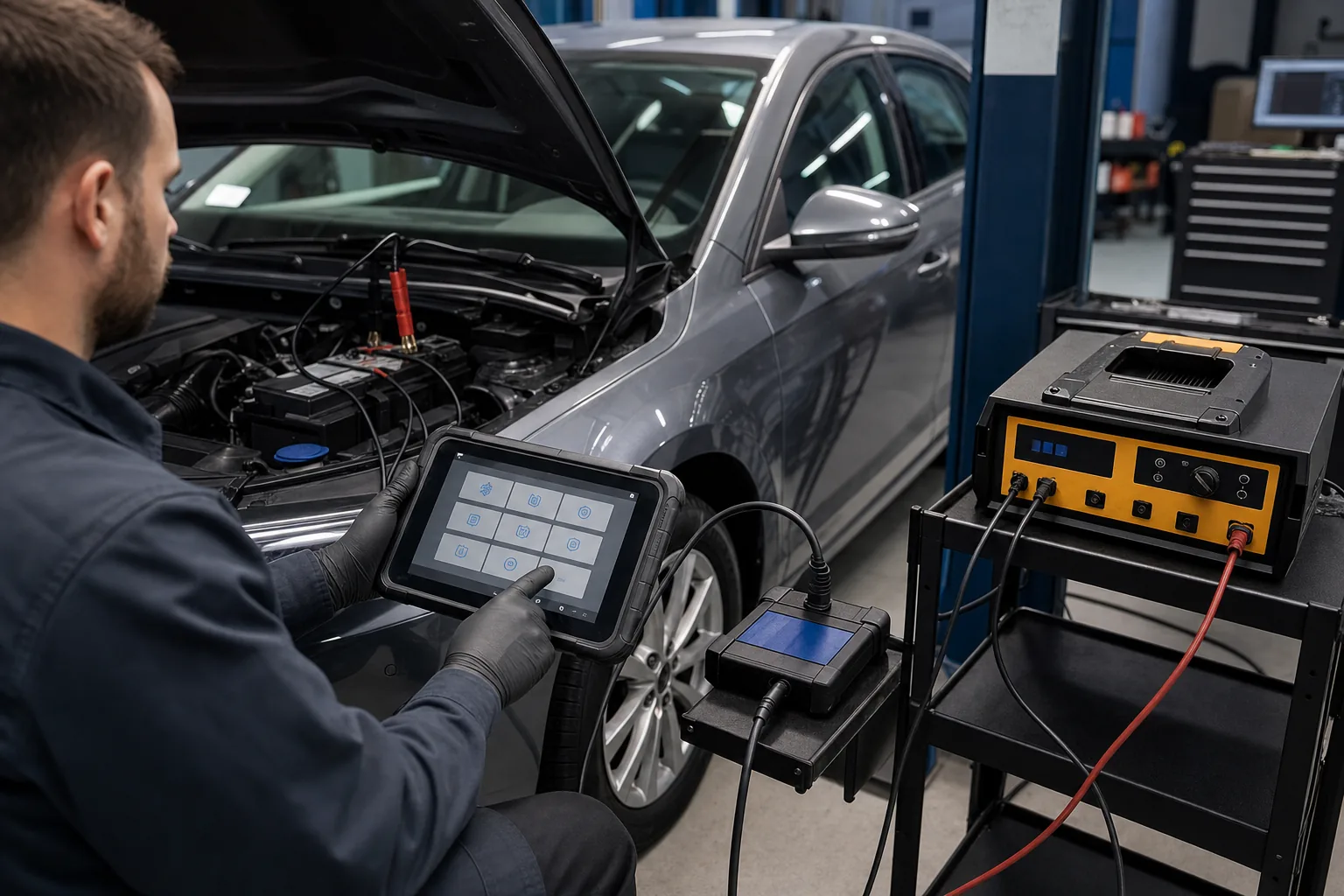
Thinktool Pros, Reader 7, Lite, and Lite 2 comparison
The more compact devices in the Thinktool family create different steps between basic scanning and the need for regular service functions. This guide compares the Thinktool Pros, Thinktool Reader 7, Thinktool Lite, and Thinktool Lite 2 models based on service work, connection conditions, package, and usage cost.
Thinktool Pros, Reader 7, Lite, and Lite 2 Comparison: Technical Comparison
Thinktool Pros, Thinktool Reader 7, Thinktool Lite, and Thinktool Lite 2 are compared based on entry or service level, screen and portability, service functions, and daily vehicle traffic.
Comparison Criteria
Thinktool Pros
Thinktool Reader 7
Thinktool Lite
Thinktool Lite 2
Product Type
Service - Vehicle diagnostic devices
Entry Level - Vehicle Diagnostic Tools
Service - Vehicle diagnostic devices
Service - Vehicle diagnostic devices
Main Use
Service Use / Diagnostic Check
Codes and Live Data in 7 Systems / OBD II/EOBD Checks
Service Diagnostics / Live Data
Service Scan / DoIP/CAN FD Requirement
Entry or Service Level
Service Use / Function Scope
Codes and Live Data in 7 Systems / Vehicle and System Scope
7 Maintenance Functions out of 28 Options / Fixed Wired Use
Maintenance Operations / Package Contents
Maintenance Functions / License Information
Daily Vehicle Traffic
Service Use / Function Scope
Codes and Live Data in 7 Systems / Update Conditions
Service Diagnostics / Model Difference
Service Scan / Protocol Support
Initial Check
Function Scope / Updates
Vehicle and System Scope / 7 Selected Maintenance Functions
Model Difference / Updates
Protocol Support / Vehicle Scope
Decision guide
What is the main difference between Thinktool Pros, Thinktool Reader 7, Thinktool Lite, and Thinktool Lite 2?
The choice between Thinktool Pros, Thinktool Reader 7, Thinktool Lite, and Thinktool Lite 2 is made based on entry or service level, screen and portability, service functions, and daily vehicle traffic metrics. During dealership vehicle pre-checks, the connection method, supported service menu, and the record obtained at the end of the operation indicate the model difference. For the Thinktool Pros, Reader 7, Lite, and Lite 2 comparison, screen size or price do not replace the required vehicle and function scope.
Thinktool Pros is a service-level diagnostic device. Its primary use cases and hardware specifications include: service use, diagnostic check, and tablet use. When comparing Thinktool Pros, entry or service level, function scope, and updates are considered.
Thinktool Reader 7 is an entry-level diagnostic device. Its primary use cases and hardware specifications include: codes and live data in 7 systems, OBD II/EOBD checks, and 7 maintenance functions out of 28 options. When comparing Thinktool Reader 7, entry or service level, vehicle and system scope, and 7 selected maintenance functions are considered.
Thinktool Lite is a service-level diagnostic device. Its primary use cases and hardware specifications include: service diagnostics and live data, and maintenance operations. When comparing Thinktool Lite, entry or service level, model difference, and updates are considered.
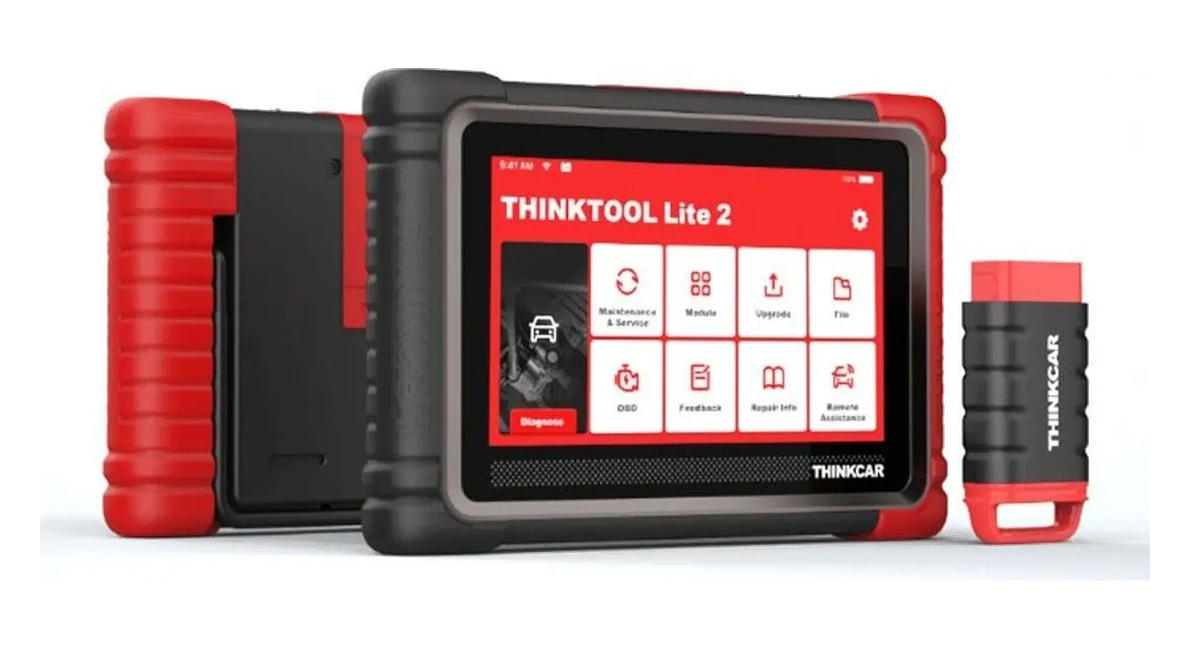
Thinktool Lite 2 is a service-level diagnostic device. Its primary use cases and hardware specifications include: service scanning, DoIP/CAN FD requirement, and maintenance functions. When comparing Thinktool Lite 2, entry or service level, protocol support, and vehicle scope are considered.
Decision guide
Thinktool Pros, Reader 7, Lite, and Lite 2 Technical Specifications
The technical comparison of Thinktool Pros, Thinktool Reader 7, Thinktool Lite, and Thinktool Lite 2 explains the function, connection, and results of each feature. For the Thinktool Pros, Reader 7, Lite, and Lite 2 comparison, entry or service level and screen and portability are based on the manufacturers' current product and vehicle information. Screen size, memory, protocol, number of operations, or vehicle count not found in the official source will not be presented as technical specifications in the Thinktool Pros, Reader 7, Lite, and Lite 2 comparison.
Verified technical information for Thinktool Pros includes: Product Type: Vehicle Diagnostic Devices; Usage Level: Service; Key Functions: Service Use and Diagnostic Check. When using Thinktool Pros, function scope, updates, and entry or service level are checked together. Screen size, memory, protocol, number of operations, or vehicle count not found in the official Thinktool Pros source will not be presented as technical specifications.
Verified technical information for Thinktool Reader 7 includes: Number of Systems: 7; Verified Diagnostic Functions: Read/Clear Codes and Live Data; Unverified Functions: Active Test, Coding, and Programming. When using Thinktool Reader 7, vehicle and system scope, 7 selected maintenance functions, and entry or service level are checked together. Screen size, memory, protocol, number of operations, or vehicle count not found in the official Thinktool Reader 7 source will not be presented as technical specifications.
Verified technical information for Thinktool Lite includes: Product Type: Vehicle Diagnostic Devices; Usage Level: Service; Key Functions: Service Diagnostics and Live Data. When using Thinktool Lite, model difference, updates, and entry or service level are checked together. Screen size, memory, protocol, number of operations, or vehicle count not found in the official Thinktool Lite source will not be presented as technical specifications.
Verified technical information for Thinktool Lite 2 includes: Product Type: Vehicle Diagnostic Devices; Usage Level: Service; Key Functions: Service Scanning and DoIP/CAN FD Requirement. When using Thinktool Lite 2, protocol support, vehicle scope, and entry or service level are checked together. Screen size, memory, protocol, number of operations, or vehicle count not found in the official Thinktool Lite 2 source will not be presented as technical specifications.
Entry or Service Level
Screen and Portability
Service functions
Daily Vehicle Traffic
Decision guide
Thinktool Pros, Thinktool Reader 7, Thinktool Lite, and Thinktool Lite 2 Connection and Package Differences
In the Thinktool Pros, Thinktool Reader 7, Thinktool Lite, and Thinktool Lite 2 packages, the tablet or main device, VCI, cables, adapters, power supply, and carrying equipment vary by model. Optional modules in the product images for Thinktool Pros, Reader 7, Lite, and Lite 2 are included in the standard package only if their name and quantity are listed in the box contents. Daily vehicle traffic indicates the impact of the included hardware and any additional accessories on the total cost for these models.
The Thinktool Pros package includes the tablet or main device, VCI, cables, adapters, power supply, and carrying equipment as separate items. When delivering Thinktool Pros, function scope, updates, package contents, and box contents are checked together. Optional equipment is included in the purchased package only if explicitly stated in the Thinktool Pros box contents.
The Thinktool Reader 7 package includes the tablet or main device, VCI, cables, adapters, power supply, and carrying equipment as separate items. When delivering Thinktool Reader 7, vehicle and system scope, 7 selected maintenance functions, fixed wired use, and update conditions, along with box contents, are checked together. Optional equipment is included in the purchased package only if explicitly stated in the Thinktool Reader 7 box contents.
The Thinktool Lite package includes the tablet or main device, VCI, cables, adapters, power supply, and carrying equipment as separate items. When delivering Thinktool Lite, model difference, updates, package contents, and box contents are checked together. Optional equipment is included in the purchased package only if explicitly stated in the Thinktool Lite box contents.
The Thinktool Lite 2 package includes the tablet or main device, VCI, cables, adapters, power supply, and carrying equipment as separate items. When delivering Thinktool Lite 2, protocol support, vehicle scope, and license information, along with box contents, are checked together. Optional equipment is included in the purchased package only if explicitly stated in the Thinktool Lite 2 box contents.
Decision guide
Thinktool Pros, Reader 7, Lite, and Lite 2: Software and Usage Costs
In addition to the initial sales price for Thinktool Pros, Thinktool Reader 7, Thinktool Lite, and Thinktool Lite 2, the included software period, renewal method, VCI, cables, and optional modules also affect the usage cost. In the comparison of Thinktool Pros, Reader 7, Lite, and Lite 2, the device account, serial number, update region, and physical package are examined together. When the entry or service level changes, the required hardware or license package may also change.
For Thinktool Pros usage, the device account, serial number, included software period, and renewal method are recorded. Function scope, updates, and entry or service level for Thinktool Pros are checked during delivery and initial setup. If Thinktool Pros is used jointly in the workshop, the user, VCI, and operation logging procedures are determined.
For Thinktool Reader 7 usage, the device account, serial number, included software period, and renewal method are recorded. Vehicle and system scope, 7 selected maintenance functions, and entry or service level for Thinktool Reader 7 are checked during delivery and initial setup. If Thinktool Reader 7 is used jointly in the workshop, the user, VCI, and operation logging procedures are determined.
For Thinktool Lite usage, the device account, serial number, included software period, and renewal method are recorded. Model difference, updates, and entry or service level for Thinktool Lite are checked during delivery and initial setup. If Thinktool Lite is used jointly in the workshop, the user, VCI, and operation logging procedures are determined.
For Thinktool Lite 2 usage, the device account, serial number, included software period, and renewal method are recorded. Protocol support, vehicle scope, and entry or service level for Thinktool Lite 2 are checked during delivery and initial setup. If Thinktool Lite 2 is used jointly in the workshop, the user, VCI, and operation logging procedures are determined.
Difference between active test, adaptation, coding, and programming in diagnostic devices
Decision guide
What does each product do during a dealership vehicle pre-check?
For dealership vehicle pre-checks, the entry or service level, vehicle make-model-year information, and connection conditions are examined. Thinktool Pros, Thinktool Reader 7, Thinktool Lite, and Thinktool Lite 2 are compared for dealership vehicle pre-checks only based on the menus supported in the manufacturer's current vehicle and function list. At the end of the dealership vehicle pre-check, the initial scan, applied service step, and final check are saved in the same work order.
When planning a dealership vehicle pre-check with Thinktool Pros, function scope, current vehicle and function list, and entry or service level are examined. If dealership vehicle pre-check is supported in the Thinktool Pros menu, the initial scan, applied service step, and final check are kept in the same service record.
When planning a dealership vehicle pre-check with Thinktool Reader 7, vehicle and system scope, current vehicle and function list, and entry or service level are examined. If dealership vehicle pre-check is supported in the Thinktool Reader 7 menu, the initial scan, applied service step, and final check are kept in the same service record.
When planning a dealership vehicle pre-check with Thinktool Lite, model difference, current vehicle and function list, and entry or service level are examined. If dealership vehicle pre-check is supported in the Thinktool Lite menu, the initial scan, applied service step, and final check are kept in the same service record.
When planning a dealership vehicle pre-check with Thinktool Lite 2, protocol support, current vehicle and function list, and entry or service level are examined. If dealership vehicle pre-check is supported in the Thinktool Lite 2 menu, the initial scan, applied service step, and final check are kept in the same service record.
Decision guide
What does each product do during a mobile technician scan?
For mobile technician scans, screen and portability, vehicle make-model-year information, and connection conditions are examined. Thinktool Pros, Thinktool Reader 7, Thinktool Lite, and Thinktool Lite 2 are compared for mobile technician scans only based on the menus supported in the manufacturer's current vehicle and function list. At the end of the mobile technician scan, the initial scan, applied service step, and final check are saved in the same work order.
When planning a mobile technician scan with Thinktool Pros, updates, current vehicle and function list, and screen and portability are examined. If mobile technician scan is supported in the Thinktool Pros menu, the initial scan, applied service step, and final check are kept in the same service record.
When planning a mobile technician scan with Thinktool Reader 7, 7 selected maintenance functions, current vehicle and function list, and screen and portability are examined. If mobile technician scan is supported in the Thinktool Reader 7 menu, the initial scan, applied service step, and final check are kept in the same service record.
When planning a mobile technician scan with Thinktool Lite, updates, current vehicle and function list, and screen and portability are examined. If mobile technician scan is supported in the Thinktool Lite menu, the initial scan, applied service step, and final check are kept in the same service record.
When planning a mobile technician scan with Thinktool Lite 2, vehicle scope, current vehicle and function list, and screen and portability are examined. If mobile technician scan is supported in the Thinktool Lite 2 menu, the initial scan, applied service step, and final check are kept in the same service record.
Decision guide
What does each product do during maintenance operations in a small workshop?
For maintenance operations in a small workshop, service functions, vehicle make-model-year information, and connection conditions are examined. Thinktool Pros, Thinktool Reader 7, Thinktool Lite, and Thinktool Lite 2 are compared for maintenance operations in a small workshop only based on the menus supported in the manufacturer's current vehicle and function list. At the end of maintenance operations in a small workshop, the initial scan, applied service step, and final check are saved in the same work order.
When planning maintenance operations in a small workshop with Thinktool Pros, package contents, current vehicle and function list, and service functions are examined. If maintenance operations in a small workshop are supported in the Thinktool Pros menu, the initial scan, applied service step, and final check are kept in the same service record.
When planning maintenance operations in a small workshop with Thinktool Reader 7, fixed wired use, current vehicle and function list, and service functions are examined. If maintenance operations in a small workshop are supported in the Thinktool Reader 7 menu, the initial scan, applied service step, and final check are kept in the same service record.
When planning maintenance operations in a small workshop with Thinktool Lite, package contents, current vehicle and function list, and service functions are examined. If maintenance operations in a small workshop are supported in the Thinktool Lite menu, the initial scan, applied service step, and final check are kept in the same service record.
When planning maintenance operations in a small workshop with Thinktool Lite 2, license information, current vehicle and function list, and service functions are examined. If maintenance operations in a small workshop are supported in the Thinktool Lite 2 menu, the initial scan, applied service step, and final check are kept in the same service record.
Decision guide
Thinktool Pros, Reader 7, Lite, and Lite 2: Which product is suitable for which task?
Small workshops, mobile technicians, dealerships, and users selecting their first professional diagnostic device. The selection of Thinktool Pros, Reader 7, Lite, and Lite 2 comparison considers vehicle group, supported functions, VCI connection, daily transaction volume, and reporting method together. If maintenance operations are to be performed regularly in a small workshop, this operation must be included in the manufacturer's current vehicle and function list. For the Thinktool Pros, Reader 7, Lite, and Lite 2 comparison, screen size or hardware level alone is not a reason for selection if the required service menu is not available.
Thinktool Pros is suitable for users needing service-class diagnostic capabilities, those looking for a THINKCAR alternative, and workshops preferring tablet operation. Thinktool Pros is not suitable for users needing only a motorcycle device or only a connection cable. When selecting Thinktool Pros, function scope, updates, entry or service level, and the delivered package are considered.
Thinktool Reader 7 is suitable for users performing basic diagnostics in engine, transmission, ABS, SRS, body, climate control, and instrument cluster systems; mobile technicians who want a compact, wired, vehicle-powered, single-unit device; and vehicle owners who want to view OBD II/EOBD emission controls and live data from the same device. Thinktool Reader 7 is not suitable for services requiring full system scanning and bidirectional active tests on all vehicle control units, or workshops that mandate ECU coding, online programming, J2534, DoIP, or CAN FD connectivity. When selecting Thinktool Reader 7, vehicle and system scope, 7 selected maintenance functions, entry or service level, and the delivered package are considered.
Thinktool Lite is suitable for transitioning to service-class diagnostics, live data, maintenance operations, and passenger vehicle diagnostics. Thinktool Lite is not suitable for advanced programming expectations or heavy-duty vehicle use. When selecting Thinktool Lite, model difference, updates, entry or service level, and the delivered package are considered.
Thinktool Lite 2 is suitable for DoIP/CAN FD requirements, mid-level service use, and passenger vehicle diagnostics. Thinktool Lite 2 is not suitable for heavy-duty vehicle connectivity or EV-focused coverage. When selecting Thinktool Lite 2, protocol support, vehicle scope, entry or service level, and the delivered package are considered.
Decision guide
Thinktool Pros, Reader 7, Lite, and Lite 2 Comparison: Selection Summary
The choice between Thinktool Pros, Thinktool Reader 7, Thinktool Lite, and Thinktool Lite 2 is made based on entry or service level, screen and portability, service functions, and daily vehicle traffic metrics. For the Thinktool Pros, Reader 7, Lite, and Lite 2 comparison, the current vehicle and function list, connection hardware, software period, and box contents are examined together. The current sales status for Thinktool Pros, Thinktool Reader 7, Thinktool Lite, and Thinktool Lite 2 is shown on the respective product pages.
Frequently Asked Questions
Most frequently asked questions by customers
Which Thinktool Pros, Thinktool Reader 7, Thinktool Lite, and Thinktool Lite 2 model is suitable for which task?
The choice between Thinktool Pros, Thinktool Reader 7, Thinktool Lite, and Thinktool Lite 2 is made based on the service's vehicle profile, daily transaction volume, entry or service level, screen and portability, service functions, and daily vehicle traffic metrics. If regular vehicle pre-checks are performed in the dealership, the required connection and function take priority in this scenario.
Do Thinktool Pros, Thinktool Reader 7, Thinktool Lite, and Thinktool Lite 2 offer the same functions on every vehicle or main device?
No. The functions on Thinktool Pros, Thinktool Reader 7, Thinktool Lite, and Thinktool Lite 2 vary depending on the product type, make, model, year, control unit, connection, and installed software package. For a comparison of Thinktool Pros, Reader 7, Lite, and Lite 2, models communicating with the vehicle are checked against the manufacturer's current vehicle and function list, and accessories are checked against the main device and connector information.
Are active test, coding, and programming the same operation for Thinktool Pros, Thinktool Reader 7, Thinktool Lite, and Thinktool Lite 2?
No. In the comparison of Thinktool Pros, Thinktool Reader 7, Lite, and Lite 2, active test operates the supported component with a command; adaptation and coding manage settings in the existing control unit; programming may involve writing software or data. Entry or service level and the operation to be performed require manufacturer procedures and stable vehicle voltage.
Are all parts in the package image for Thinktool Pros, Thinktool Reader 7, Thinktool Lite, and Thinktool Lite 2 included in the box?
Optional modules or different packages may be shown in the same frame in the manufacturer images for Thinktool Pros, Thinktool Reader 7, Lite, and Lite 2. For each product in the comparison of Thinktool Pros, Reader 7, Lite, and Lite 2, the main device, VCI, cables, adapters, power supply, and carrying equipment to be delivered are specified in their respective box content lists.
How are the update and license periods for Thinktool Pros, Thinktool Reader 7, Thinktool Lite, and Thinktool Lite 2 compared?
For Thinktool Pros, Thinktool Reader 7, Lite, and Lite 2, the included update period, renewal method, device account, serial number, and account region are examined separately. The comparison page for Thinktool Pros, Reader 7, Lite, and Lite 2 does not carry over promotions from other countries to the Turkish package; the current conditions of the purchased product are shown on the respective product page.
Where are the current prices for Thinktool Pros, Thinktool Reader 7, Thinktool Lite, and Thinktool Lite 2 shown?
Product and update prices for Thinktool Pros, Thinktool Reader 7, Lite, and Lite 2 are shown on their respective product pages according to the package and sales status. The comparison of Thinktool Pros, Reader 7, Lite, and Lite 2 explains the device type, technical differences, and package structure, rather than fixing an old price.
What sources are the technical information for the Thinktool Pros, Reader 7, Lite, and Lite 2 comparison based on?
The specifications for Thinktool Pros, Thinktool Reader 7, Lite, and Lite 2 are taken from the manufacturers' official product pages, catalogs, vehicle and function lists, and software documentation. The sources for the Thinktool Pros, Reader 7, Lite, and Lite 2 comparison are listed in the technical resources section at the end of the page. Any claim not found in the official source for Thinktool Pros, Thinktool Reader 7, Lite, and Lite 2 will not be added to the technical table.
Thinktool Reader 7 is a 5-inch wired device that reads codes and live data in seven vehicle systems, offering seven maintenance functions from 28 options.

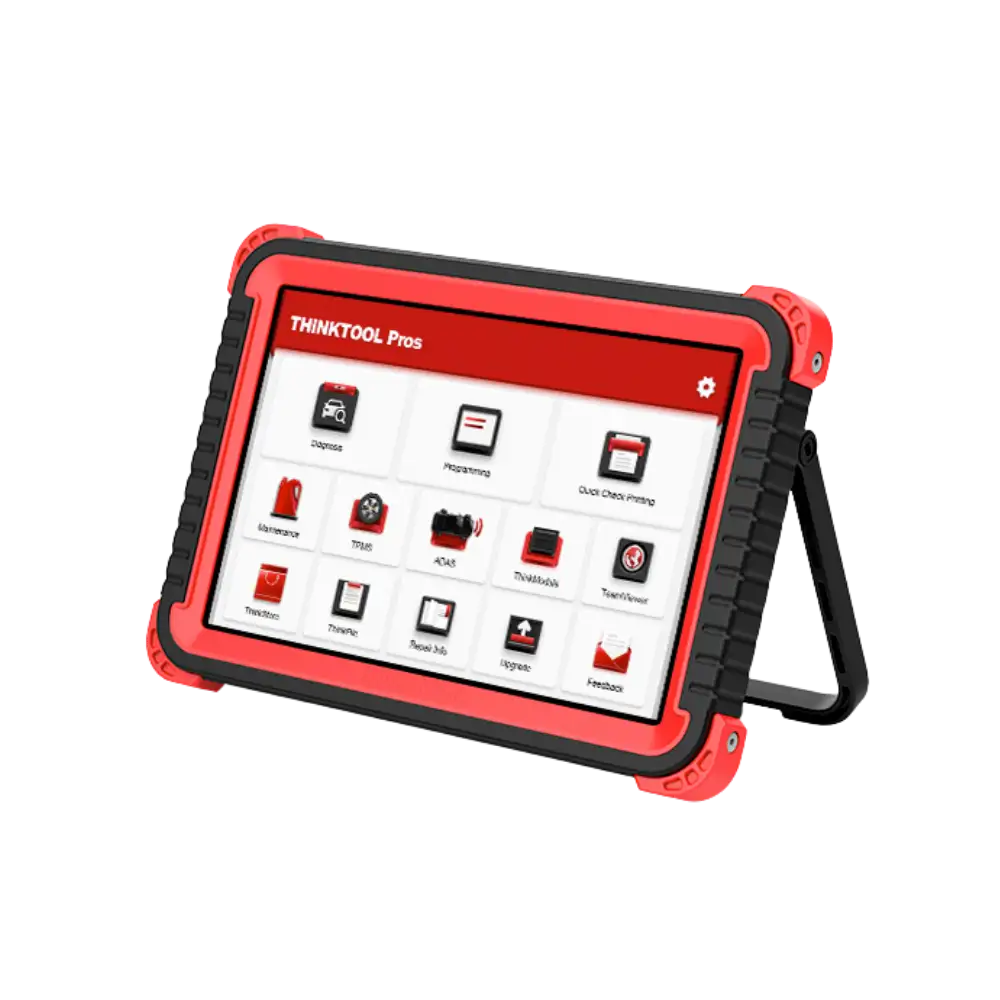 Thinktool Pros
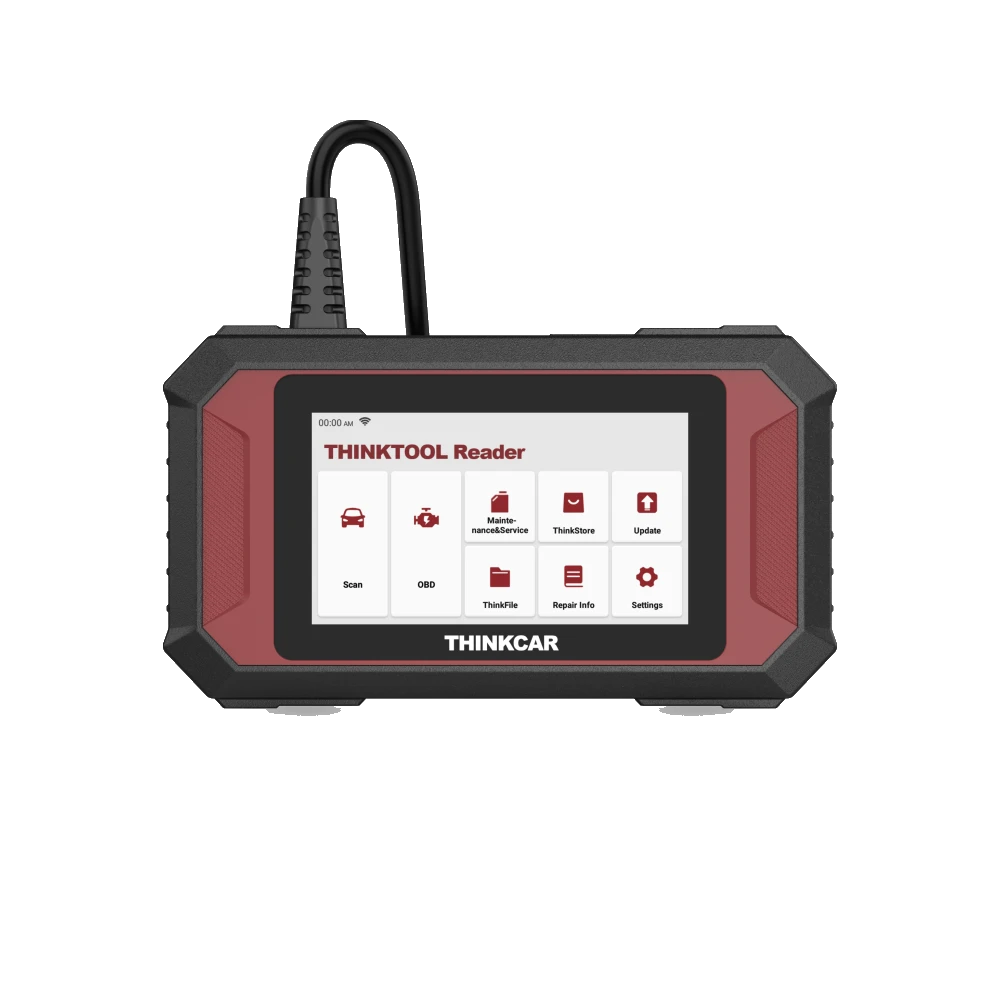 Thinktool Reader 7
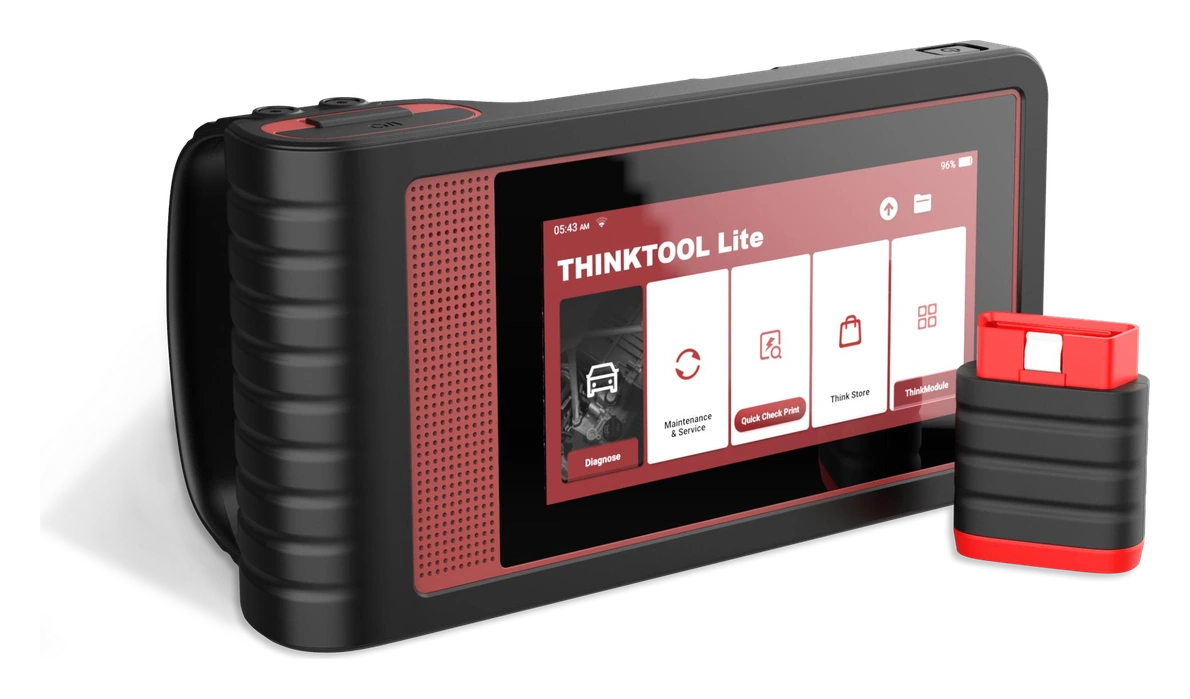 Thinktool Lite
 Thinktool Lite 2