Product information
What is the THINKCAR PROG 2 used for?
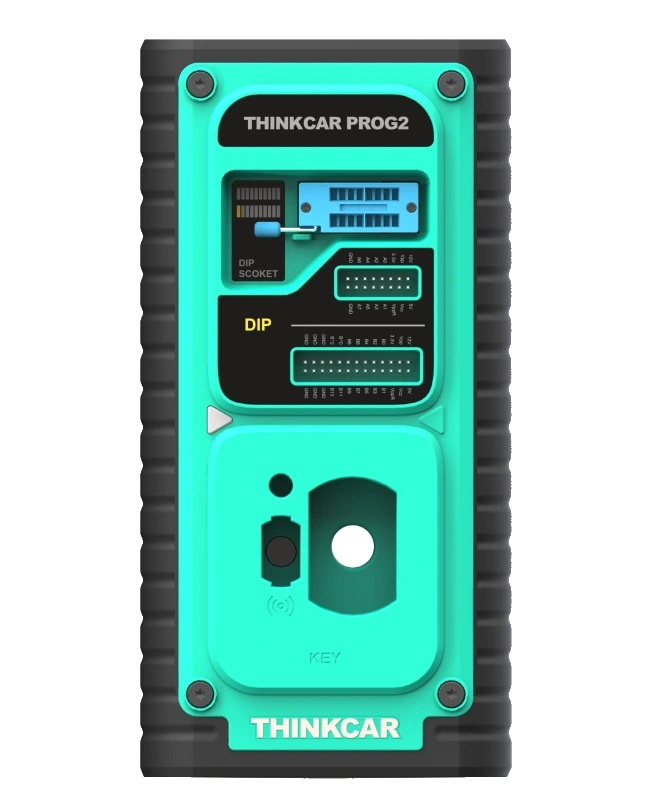
The THINKCAR PROG 2 is a professional key and immobilizer programming module used in conjunction with a compatible Thinktool main device. The manufacturer specifies data read/write functions on supported ECU, MCU, and EEPROM types, as well as IMMO data backup and restore. It operates on key chips and specific immobilizer components; it is not an independent diagnostic tablet.
Manufacturer documentation lists main devices such as MAX, X10, Master X, Master, and Master II. Support is controlled by system, part, and operation; the presence of a brand on the list does not mean all key loss situations can be handled on every vehicle.
This product is not the same option as the older PROG or PROG S.
Programming module scope
Which main unit and components is PROG 2 used with?
PROG 2 is not a standalone diagnostic tablet. It requires a compatible Thinktool main unit, the correct adapter, and the component clearly supported in the software to perform operations.
- Compatible main devices
- THINKTOOL MAX, X10, Master X, Master, and Master II; regional software and module menu are checked separately.
- Components
- Supported IMMO, ECU, MCU, and EEPROM families are verified with the exact part or chip ID.
- Operation distinction
- Reading, writing, backup, and part replacement are not the same scope; each must be separately supported in the device menu.
- Package limit
- The main tablet and T-Key are separate products. The lifetime update condition for the PROG S model is not transferred to PROG 2.
- Support for an ECU family does not imply support for all operations on all part numbers. Operations are performed only within the scope of authorized service according to manufacturer procedures.
Open official sources and coverage connectionsProduct details
Functions of the programmer module and diagnostic tablet
The main device provides the operation menu, software, and guidance; the programmer establishes the necessary physical data connection with the supported chip or component. Due to this division of labor, purchasing the module alone does not create a complete key service system.
The compatible tablet, relevant software, correct connection adapter, and the scope of the part to be worked on must all be compatible. The presence of a socket on the programmer does not mean every memory can be inserted into the same slot and read in the same way. For each operation, follow the manufacturer's software selection and connection guidance.
On-vehicle diagnostics and off-vehicle component operations are also separate steps.
Product details
Which Thinktool main devices is it used with?
The manufacturer's PROG 2 documentation includes main devices such as Thinktool MAX, X10, Master X, Master, and Master II. These names are not a general compatibility statement covering all devices of the same brand. The regional model name, device software, and relevant module menu are checked.
A model on the manufacturer's list with very old software or a different sales package may not have the same operating conditions. Before establishing a connection, check the appropriate menu and update status on the main device. The device recognizing an accessory does not indicate that all vehicle software and security accesses are free or included in the package.
Additional services required for the intended task are evaluated separately.
Product details
How to interpret ECU, MCU, and EEPROM support?
ECU refers to the control unit, MCU to the microcontroller, and EEPROM to a specific type of memory. These are not three synonyms for the same part. The manufacturer specifies read/write scope for over a thousand supported ECU, MCU, and EEPROM types.
This number is not a universal vehicle count or a guarantee that the same operation can be performed on all parts. Differences in hardware and software versions can exist within the same control unit family. Operation selection is made based on the correct identification on the part, memory type, and the manufacturer's support list.
Read, write, backup, or component replacement options must each be supported separately; the existence of one does not automatically imply the existence of the others.
Product details
What is IMMO backup and restore for?
Backing up data related to the immobilizer system helps keep a record of the original state before a supported service operation. Restore is for reusing appropriate and verified data within the workflow permitted by the manufacturer. Finding a file belonging to the wrong part does not mean it is a valid restore source.
Traceability is maintained between the file name, vehicle ID, part number, and operation date. The ability to make a backup is not a promise that every failed write operation can be reversed. A software backup on an electrically or physically damaged component does not solve all problems. These functions are evaluated within the scope of authorized maintenance and part replacement.
Product details
Read and write on key chip
The programmer offers data operations for supported key chips. Reading the chip does not mean the same key can be duplicated or programmed to a different vehicle for every vehicle. Lock status, chip family, and vehicle security system affect the operation scope. The technician first selects the correct part type and follows the relevant manufacturer's guidance.
Key preparation, programming to the vehicle, and mechanical key cutting are separate tasks. This product is not a machine that automatically completes all of them within a single unit. Blank keys, all types of transponders, or mechanical cutting equipment are not automatically included in the sales package; necessary consumables are determined by the task.
Product details
Why are Mercedes and BMW headings evaluated on a per-operation basis?
The manufacturer shows specific system examples in its documentation, such as Mercedes infrared keys and BMW CAS4/FEM. These examples are not an open check for all model years, all immobilizer versions, or all key loss situations for the brand. The actual system and part identification on the vehicle are matched with software support.
The presence of the Benz IR key adapter does not indicate that all Mercedes keys are processed in the same way. Listing the BMW system name does not automatically provide support for other security generations. The service plan starts with the component on the vehicle, not the general brand name. Operations are not applied by selecting a similar menu for a system not supported by the manufacturer.
Product details
Service Scenario: Backing up original memory before operation
Before making changes to a supported component, the part number and memory type are identified. The technician selects the appropriate adapter, establishes the connection according to the manufacturer's guidance, and reads the original data. The file is associated with the vehicle and work order; files from different customers are not saved under the same name. The write phase is not initiated until the read result is verified.
Having a copy of the backup does not make an operation performed with an incorrect connection or voltage safe. The location where the file is stored and the operation date are recorded. The purpose of this scenario is to maintain data traceability; it is not for attempting to write to unsupported memory. After the operation, the actual operating condition of the part is checked separately.
Product details
Service Scenario: Supported immobilizer component replacement
When replacing a faulty component, it is first diagnosed that the fault is indeed caused by this part. The identification and compatibility of the new or to-be-used part with the vehicle are determined. The data operation supported by the programmer is compared with the vehicle manufacturer's replacement procedure. After preparing the appropriate data backup and adapter, only the supported operation is performed.
Once the off-vehicle write is complete, on-vehicle programming, fault logging, and operational checks are performed separately. The part having the same socket does not prove it is the correct hardware or software version. The work order indicates the component used and the steps completed; the programmer's success message alone does not represent the entirety of the vehicle repair.
Product details
Service Scenario: Key preparation for authorized key operation
After the vehicle owner's authorization is verified, the current key status and the required operation are identified. The technician selects the correct key chip family and performs the preparation and data operation through the supported menu. The necessary vehicle programming step is planned as a separate phase.
It is determined in advance whether the working key will be preserved and which keys will be used at the end of the job. The operation on the programmer does not mean the mechanical key blade has been cut or that all keys in the vehicle have been tested. The final check involves verifying operation according to the vehicle procedure and supported remote functions.
The number of keys and delivered parts are communicated to the customer with the record.
Product details
Service Scenario: Matching the correct file with the correct part
Mixing files when working on multiple control units of the same family in a workshop is a significant operational error. The technician does not create the backup name solely with the brand name; they match it with the work order and part identification. The hardware and support information of the part to be written to is re-checked.
A file previously used on a similar vehicle is not automatically considered suitable for the new part. The manufacturer's verification and restore workflow is followed. Unsupported conversion or merging of different files is not presented as a standard function of this product.
File management is one of the fundamental conditions for a correct and traceable service result, independent of the programmer's speed.
Product details
Adapter selection is not just about the socket fitting
The manufacturer defines different MCU, EEPROM, and connection adapters in the package. Each adapter is used for a specific part or operation indicated by the software. Similar pin counts do not prove correct electrical connection. Chip orientation, connection method, and power requirements are matched with the manufacturer's instructions.
Physically forcing the wrong adapter or completing a missing connection with a makeshift connection is not proper use. This page provides purchase and scope information, not pin connection or security system bypass instructions. Operations on sensitive electronic parts should be performed by technicians with appropriate equipment and experience.
The programmer does not eliminate this need for expertise.
Product details
Manufacturer's standard adapter and cable list
The official brochure shows the main PROG 2 unit, power adapter, diagnostic connection cable, INS V1/V2 and BENCH V1 connections, A–E cables, EEPROM adapter and converter, MCU V1/V2 parts, V1 cable, Benz IR analog key, and user documentation.
The list describes the standard configuration for this model; parts from other PROG versions are not included here. Specifically, accessories not shown in the package list of this document, such as MCU V3, are not included. Tablets, vehicle brand accounts, mechanical key machines, and all blank key types are also excluded from this list.
Upon delivery, the model and versions of the parts are compared with the manufacturer's relevant list.
Product details
Stable power supply and electronic working environment
During read and write operations, the power supply conditions of the device and the component being worked on must comply with the manufacturer's instructions. Cable disconnection, connection point movement, or power interruption during the operation can corrupt data processing. The workbench is arranged so that the part and adapter remain stable, and liquids and metal particles are kept away from electronic surfaces.
Appropriate electrostatic protection and service equipment are used for sensitive board operations. Voltage support required for on-vehicle operations is a separate matter; the programmer's power adapter is not a workshop power supply that powers the entire vehicle. In both cases, the device's instructions and the vehicle procedure are applied together.
Product details
What to do if reading or writing is not completed?
A failed operation does not solely indicate a faulty part. Incorrect part selection, an unsuitable adapter, connection issues, power supply, or support limitations can lead to the same outcome. Operations are not repeated randomly with different menus. First, the selected model, part identification, connection arrangement, and software conditions are checked.
The original backup is preserved; the file created during a failed attempt is not overwritten on the original file. The manufacturer's relevant troubleshooting or support steps are followed. There is no guarantee that all failed writes can be reversed. Writing files from different sources to a component without the necessary evidence is not recommended as part of the safe use of this product.
Product details
Do not confuse with older PROG and PROG S
The manufacturer has products using the PROG name in different generations. The page prepared for PROG 2 does not automatically inherit the price, package, or functions of the older PROG product. Similarly, an update statement under the PROG S name does not create a licensing commitment for this model.
When comparing purchases, the exact model name, compatible main device, adapter list, and supported operation are examined together. The similarity of the external casing alone does not indicate the presence of the same electronic and software scope. The model match on the product label and manufacturer documentation is maintained.
This distinction helps prevent selecting a package with accessories but without support for the required task.
Product details
T-Key 101 or PROG 2?
T-Key 101 focuses on supported remote and chip preparation, recognition, and frequency control tasks. PROG 2 is a different programming module for supported data operations on memory and immobilizer components with its compatible main device. The presence of the word "key" in both product names does not mean they are the same equipment.
If the workshop's need is to prepare blank remotes, then support for that family and consumables is examined; if it is to work with control unit or memory data, then the full operation and adapter scope for PROG is evaluated. The fact that some workflows may require multiple modules does not mean both are included in this package.
The comparison starts with the question of which stage of the job the equipment is being sought for.
Product details
General ECU support does not cover all software tasks
The ECU read/write heading is not a claim to perform performance calibration for all control units, install manufacturer software on every vehicle, or perform all protected operations. The scope of the operation depends on the supported part and software procedure. Daily diagnostic coding, adaptation, memory backup, and flash programming are different workflows.
If a workshop plans to offer a specific commercial service, it lists the required vehicles and modules separately. The number in the programmer's general introduction does not replace this list. Operations requiring licenses, manufacturer accounts, or online access are evaluated under their own conditions; it is not assumed that all external services will be enabled by the purchased hardware.
Product details
Protecting security data and delivering the job
Immobilizer and key data are not shared openly with unauthorized persons. Files are stored only in locations accessible to authorized personnel, associated with the relevant work order. Creating copies or using data on another vehicle without the vehicle owner's permission is not within the service scope of this product.
Upon job completion, not only the off-vehicle data operation but also the necessary final checks on the vehicle are recorded. It is explained which component was replaced, which keys were delivered, and which operations were actually completed. Vehicle tests not performed are not reported as performed.
The read/write capability provided by the hardware does not eliminate the service business's responsibility for authorization verification and secure data management.