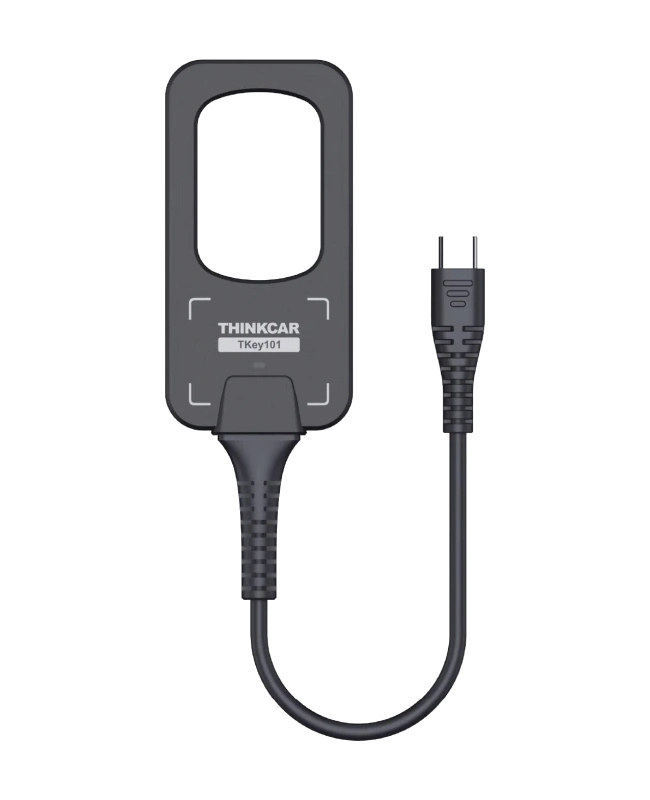
Product information
What is the THINKCAR T-Key 101 used for?
The THINKCAR T-Key 101 is a module used with the key programming menu of a compatible Thinkcar main device. Its functions include preparing supported remotes, chip recognition and generation, and controlling remote frequency and ignition coil signal. This sale is for the programmer only; it is not a set that includes six smart keys.
The tablet, PROG module, blank remotes, and super chips are evaluated separately. Preparing a remote and programming it to the vehicle are different operations; vehicle programming support must also be available separately. The product is not offered as a standalone universal key duplication device or a package that solves all key loss issues on all vehicles.
Programmer scope
Which main unit and keys is T-Key 101 used with?
T-Key works with the KEY PROGRAMMER menu of a compatible Thinkcar main unit. Remote control preparation, chip recognition, and frequency check are separate from the key programming procedure for the vehicle. USB port compatibility does not prove software support.
- Main unit
- Thinkcar models listed by the manufacturer in the relevant market; device model, software, and KEY PROGRAMMER menu are checked together.
- Key families
- The guide describes wired preparation for TK and wireless preparation supported for TE/TN.
- Scope limitation
- Smart key replacement excludes situations described in the guide for MQB and VW 48.
- Package
- Programmer only; the six-key set, super chip, and main unit are not included.
- Programming the prepared remote control to the vehicle must be separately supported. Smart key replacement replaces the old key; it is not a promise of an additional working copy.
Open official sources and coverage connectionsProduct details
What is sold in this package?
The product sold is the T-Key programming module. According to the business's verification of this package, a set of six smart keys is not included. Remotes and chips may be shown in the same image in the manufacturer's promotions in different markets; these visuals may depict other sales packages. Therefore, the product description here is limited to the programmer only.
Blank remotes, appropriate transponders, mechanical key blades, diagnostic tablets, and other necessary modules are selected separately based on the customer's existing equipment. When comparing packages, do not rely solely on the model name or the similarity of the main image. The price of a set from another seller is not the direct equivalent in content to a single programmer.
Product details
Why is a compatible Thinkcar main device required?
The module's functions are managed through the KEY PROGRAMMER menu on the compatible main device. Simply plugging the programmer into the USB port does not prove software compatibility. The main device's model, software, and required menu must be supported.
The manufacturer's regional compatibility lists specify certain Platinum and professional Thinktool models; this list is not a general statement covering all Thinkcar devices. A tablet sold under a different name in another market is not assumed to be the same based solely on its external appearance. The exact model and software menu of the tablet in the workshop should be checked.
This way, when purchasing a module to be used, it is not overlooked that a compatible main device may also be required to operate it.
Product details
Daily operation of the USB connection
The manufacturer describes use with a compatible main device via USB Type-A or Type-C connection. Establishing data communication via USB does not mean it will work with any key software on any computer. During programming, the cable and socket are protected from mechanical stress; the connection is not removed while the operation is in progress.
The adapter used must be compatible not only in physical shape but also with the connection requirements of the relevant main device. It is important for the programmer to remain stable on the workbench and for the key to be worked on to be placed in the correct area. This product is not a wireless OBD interface; it is not considered a socket that solely provides on-vehicle programming.
Product details
Difference between remote generation and vehicle programming
Preparing a blank remote for the appropriate vehicle family does not mean that remote will be immediately accepted by the vehicle. The preparation step creates the supported profile for the remote. Programming to the vehicle is a separate procedure required by the vehicle's immobilizer and central locking system.
The main device, vehicle software, security access, and current key status required for programming must also be compatible. The term "key programming" in the product description does not combine these two steps into a single guaranteed operation. The physical blade of the key is also a separate mechanical task.
An electronically prepared remote is not considered ready to open the corresponding mechanical lock without its blade being cut.
Product details
Preparation method in TK, TE, and TN families
The user manual distinguishes between wired preparation in the TK family and supported wireless preparation methods in the TE and TN families. Wired and wireless key preparation are distinct from the programmer's USB connection to the tablet. The manual's conditions regarding battery insertion or removal are followed according to the relevant key family.
The method used for one remote is not automatically applied to another. The similarity of the outer casing or the number of buttons is not proof of electronic compatibility. After selecting the correct blank remote and profile, follow the on-screen guidance. Do not attempt to guess compatibility by trying different families sequentially on an unrecognized key.
Product details
What question does the transponder recognition process answer?
Chip recognition helps determine the electronic identification type of a supported key. The operation of the remote buttons may not indicate that the transponder is of the correct type or has been programmed to the vehicle; these two functions are evaluated separately. The recognition result is useful for selecting the blank chip and method to be used for the subsequent task.
However, the device reading a specific chip does not mean it can copy or register the same chip to the vehicle under all conditions. Menu limitations apply to locked, unsupported, or different technology keys. The vehicle and work order to which the key belongs are preserved; parts from multiple customers are not mixed on the workbench.
Product details
Limitations of the supported chip generation function
The manufacturer offers a chip generation function; this process involves preparing a suitable blank chip for the supported target type. Not every blank transponder is suitable for the same task, and not every vehicle family uses the same chip. Consumables to be used with the programmer are selected separately; super chips are not mentioned as included in this sale.
The acceptance of the prepared chip by the vehicle still depends on the vehicle programming process. The appearance of a type in a menu does not indicate support for all security systems in all model years. Before the operation, the desired target type and the blank chip used are matched.
A successful generation message does not mean mechanical key cutting or the on-vehicle job is completed.
Product details
Check remote control frequency and ignition coil signal
Remote frequency detection helps check if the supported remote transmits when a button is pressed and the displayed frequency. This result alone does not prove the vehicle's receiver is healthy or that the remote has been programmed to the vehicle. Ignition coil signal check is also an auxiliary step in immobilizer investigation, related to the presence of a specific signal.
The detection of a signal does not mean the entire immobilizer chain is intact. The measurement result is compared with the power supply, connection, and diagnostic data on the vehicle side. These functions are not equivalent to the full capabilities of a laboratory-type spectrum analyzer or a comprehensive electrical measurement device.
Product details
Service Scenario: Preparing a compatible blank remote
After verifying the customer's authorization and vehicle information, the required remote type is identified. The technician selects the blank remote from the correct family and the appropriate main device menu. The wired or wireless preparation method is applied according to the family distinction in the manual. When preparation is complete, the result and the profile used are recorded, and the process proceeds to the next vehicle programming step.
It is determined at the beginning of the job whether a key is currently available in the vehicle and which keys will be preserved during programming. Preparation completed on the bench does not mean a working vehicle key has been delivered to the customer. The final check verifies supported electronic functions and the mechanical key blade separately.
Product details
Service Scenario: Remote button does not respond to the vehicle
The lack of response from the door locks does not solely indicate a faulty remote. The technician checks the physical condition of the remote and its battery; then, they examine the transmission behavior using the supported frequency detection function. If a signal is seen, the vehicle receiver, programming status, or other conditions on the vehicle side are investigated.
If there is no signal, a definitive conclusion about the entire circuit cannot be made with a single measurement; correct placement and measurement conditions are re-checked. This process narrows down the question before randomly purchasing a new remote. Since the presence of frequency does not mean the immobilizer chip is working or the engine will start, the transponder side is addressed separately.
Product details
Service Scenario: Determining the key's chip type
When a key has a replaced outer shell or no electronic type information, selecting the correct blank chip can be difficult. The supported recognition function helps examine the key's electronic type. The technician compares the result with the vehicle information and the operation to be performed; they do not select consumables based solely on external appearance.
If the recognized type does not match the blank chip to be used, the operation is not forced. The status of the existing working key is preserved, and no unauthorized changes are made. Since the ability to read the key does not guarantee copyability, the scope of the job is explained to the customer accordingly. This method is particularly helpful in reducing the use of incorrect consumables in service workflows where preparation and vehicle programming are performed separately.
Product details
Service Scenario: Investigating the signal around the ignition
When the vehicle does not recognize the key, the key's chip, the detection area around the ignition, and the vehicle's electronics can be different points of failure. The supported coil signal check is only one part of this investigation. The technician performs measurements under conditions compliant with the vehicle procedure; they compare the signal result with the immobilizer status shown by the diagnostic device.
The presence of a signal does not prove the key is correctly coded. The absence of a signal does not solely mean the control unit needs to be replaced. Power supply, connection, and vehicle conditions are checked separately. This workflow is not for bypassing the security system but for understanding at which stage the problem occurs within the scope of authorized service.
Product details
Smart key replacement is not additional key duplication
The supported smart key replacement function in the manufacturer's manual is described as replacing the old key with a new one. It is not assumed that the old key will continue to work; this function is not a promise to obtain two working copies.
If the existing key is to be preserved, it is determined in advance whether the operation is for adding an additional key or for replacement. Situations outside the scope, such as MQB and VW 48 mentioned in the manual, are not disregarded. These limitations do not justify attempting alternative security methods to add a key to a vehicle.
The job is performed only with the vehicle owner's authorization, within the scope of the relevant device and vehicle procedure.
Product details
Authorization and operation record in key operations
The start of a key service is the verification of vehicle and operation authorization. Vehicle information, customer request, delivered keys, and the job to be performed are recorded. The preparation and programming steps using the chip or remote type used are distinguished from each other. The impact of the working existing key on the operation and the keys that may become invalid as a result of replacement are explained to the customer.
The purpose of the records is not just to show that the operation is complete; it is to make it clear which part and method were used in case of a subsequent complaint. Security data is not shared unnecessarily. This product is not offered as a service for unauthorized access, bypassing vehicle security, or creating keys without permission.
Product details
Functional difference between T-Key and PROG 2
T-Key focuses on supported remote and chip preparation and recognition tasks. PROG 2 is a different module used with its compatible main device for supported IMMO, ECU, MCU, and EEPROM operations. The name of one module does not encompass all the functions of the other.
If the workshop's task is to prepare blank remotes, then support on the T-Key side is examined; if reading/writing data on memory or immobilizer components is required, then the full operation and adapter scope on the PROG side is evaluated. The fact that the two products are used together in a workflow does not mean both are included in this package.
Equipment selection is made by first defining the required task.
Product details
Check the main device model and software together
The manufacturer's US page lists specific devices such as Platinum S20, S12, S10 Pro, S10 TVCI, S10, and the S8 family as compatible. Regional model names are not automatically matched with Thinktool names in other markets. Check that the relevant module menu is present on your device, that the software is up-to-date, and that the connection is supported.
The fact that a diagnostic device in the Reader class is of the same brand is not proof of module support. When preparing the purchase budget, not only the programmer but also, if necessary, the compatible main device and consumables should be taken into account. This way, even if the electronically correct module is purchased, its use is not prevented due to missing equipment to operate it.
Product details
What checks are performed after preparation?
The success message from the programmer is only the result of that stage. If the key is to be used in the vehicle, the necessary programming, mechanical blade, and supported remote functions are completed. Checks such as locking, unlocking, and starting are performed according to the vehicle procedure; the status of existing keys is also checked according to the customer's request.
The response of a button does not indicate that the entire key job is completed. At the end of the job, the blank remote and chip information used are added to the service record. The number of keys delivered and old keys returned are clearly stated. A function mentioned in the device's introduction is not reported as performed if it was not actually applied to the vehicle.
Product details
Protecting the programmer and workbench
Since small electronic key parts can be easily mixed up, the work area is organized separately for each vehicle. The programmer coil, USB cable, and connection ports are checked for physical damage. Liquids, metal shavings, or particles from key cutting are kept away from electronic equipment.
Separating the mechanical cutting area from the electronic preparation area simplifies the workflow. The power supply and connection of the tablet used during the operation are protected; the cable is not pulled while the software is running. If a connection problem occurs, operations are not randomly tried on the same key.
First, the correct main device, correct menu, correct consumables, and stable connection conditions are re-examined.