Product information
What is the Toyota Compatible Mini VCI J2534 Diagnostic Cable used for?
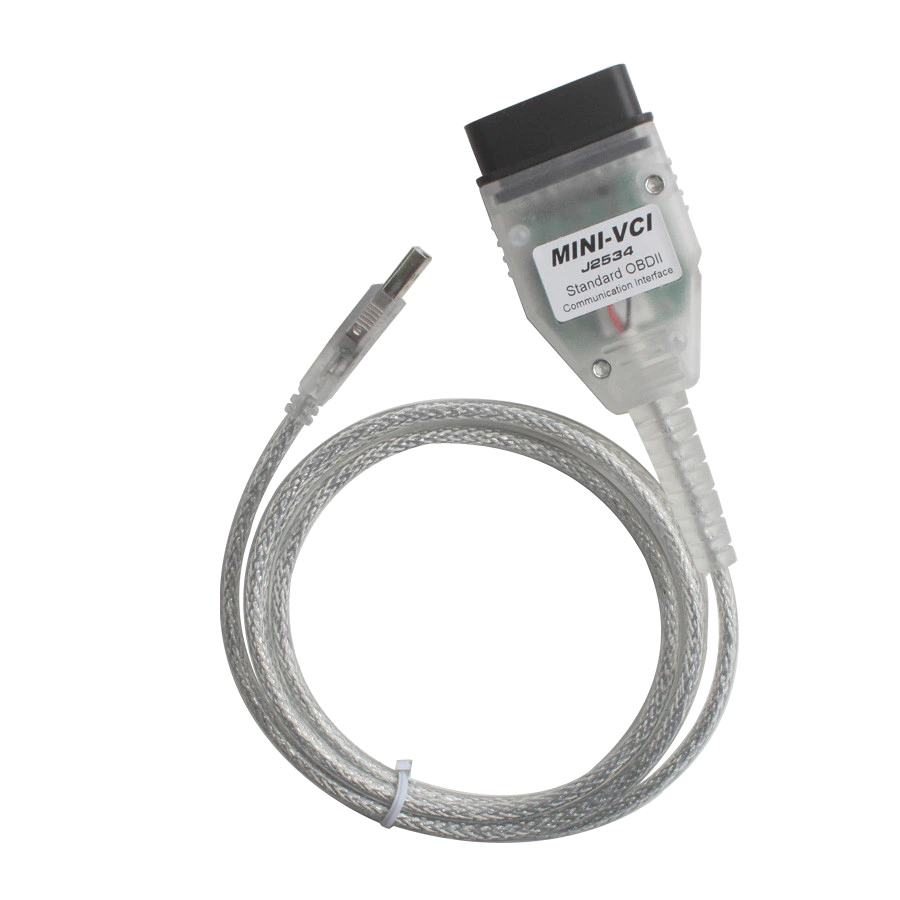
This cable is a third-party Mini VCI interface that communicates between a Windows computer and the diagnostic socket of a Toyota vehicle. It does not provide diagnostic software, license, or technical data on its own.
The term J2534 does not mean that all service and programming functions will be enabled on every Toyota model; hardware revision, driver, software version, vehicle protocol, and user authorization must work together. The primary goal in daily diagnostics is the secure recognition of the device and the completion of low-risk read tests.
ECU writing, immobilizer, key, and security operations require separate authorization, correct VIM, stable power supply, and recovery procedures.
Physical Connection Coverage
What vehicles and devices is the Toyota Compatible Mini VCI J2534 Diagnostic Cable used with?
Connecting the cable, adapter, or communication module to the vehicle does not prove that the vehicle is supported by the software. The physical connector, pin layout, main device, and vehicle software must be compatible simultaneously.
- Brand coverage
- Toyota; Lexus and Scion if explicitly supported by software and region
- Model Coverage
- Model year, ECU, vehicle protocol, Mini VCI hardware revision, and Techstream/GTS+ data package are verified together.
- Main unit
- VCI, tablet, or diagnostic interface specified in the product name and technical resources
- Physical check
- Vehicle model, production year, and control unit to be serviced, Hardware revision and USB ID of the cable to be sent, Signed driver compatibility with Windows version, Legal Toyota software, license, and regional access conditions, Requirement for professional VIM and power supply for ECU writing operations
- This product does not add new software, licenses, or service functions to the main device.
- Do not force connection without verifying the pin structure.
Open official sources and coverage connectionsProduct details
What is the Mini VCI cable used for?
The Mini VCI type cable transmits diagnostic lines from the vehicle's OBD socket to a Windows computer via USB. When compatible hardware, driver, and licensed Toyota software work together, supported control units can be scanned; fault codes, live data, and ECU identification information can be displayed.
Active tests, maintenance menus, or customization options may be available on some vehicles and systems. The appearance of these functions is determined not by the cable name, but by the vehicle's ECU, model year, software data package, and user authorization. The cable does not diagnose faults on its own; displayed codes must be verified with electrical and mechanical measurements.
- Diagnostic communication between PC and vehicle via USB
- Code, live data, and identification information on supported ECUs
- Conditional tests and customization in software menus
- Verification of results with service documentation and physical measurement
Product details
Mini VCI, J2534, and Techstream are not the same thing
The Mini VCI sales name refers to the physical cable and the communication electronics within it. J2534 is an SAE-defined pass-thru approach for communication between a PC and a vehicle programming interface. Techstream, or GTS+ as it's known regionally, is Toyota's diagnostic software environment.
The presence of J2534 on a piece of hardware does not prove official Toyota VIM identification, up-to-date drivers, software license, or verified compatibility across all protocols. Therefore, hardware, driver, and software are installed and tested as three separate components.
- Mini VCI
- Physical interfaceTransmits data between USB and OBD socket.
- J2534
- Pass-thru standardDepends on supported protocols and driver implementation.
- Techstream/GTS+
- Toyota diagnostic softwareLicense and access are separate from the cable.
Product details
Mini VCI Windows installation: step-by-step checklist
Remote or on-site installation support is not included with this product sale; driver, Windows, and software installation are entirely the user's responsibility. Before starting installation, record the label, hardware revision, and USB hardware ID of the cable sent. Install the driver only from a reliable and verifiable source, precisely matching this ID.
The cable is first plugged into the computer without connecting to the vehicle; check that there are no warning icons in Windows Device Manager, the connection is not lost, and the device appears stably. Then, open the software obtained by the user with a legal Toyota technical information or diagnostic subscription and select the correct interface on the VIM/J2534 selection screen.
After checking the ignition and battery voltage on the vehicle, make the OBD connection. Limit the initial test to reversible operations such as reading vehicle information, ECU list, and health scan only. Disabling antivirus, permanently disabling driver signature, using cracks, loaders, or pirated licenses are not recommended.
- 1. Record cable revision and USB hardware ID
- 2. Install the correct and reliable driver and check Device Manager
- 3. Select the correct VIM/J2534 interface in the legal software
- 4. Check vehicle voltage and limit the first attempt to reading only
- Installation and software support are not included in the sales package
Product details
Accepted product terms before purchase
The sales package is only one physical Mini VCI type USB-OBD cable. Techstream/GTS+ software, license, activation, driver file, CD, computer, and installation service are not provided.
It is the user's responsibility to check vehicle, ECU, Windows version, and cable hardware revision compatibility; to ensure necessary legal software access; and to complete the installation securely. A specific confirmation for this product is requested in the cart.
This confirmation does not eliminate the consumer's legal right of withdrawal and rights for defective goods; delivery and return procedures are carried out in accordance with current legislation and published delivery-return conditions.
- Installation, driver, and software support are not provided
- Vehicle and computer compatibility is verified by the user
- Pirated software, cracks, or license packs are not provided
- Statutory consumer rights are reserved
Product details
Vehicle not connecting or VIM not visible
If the computer does not recognize the cable, try a different USB port and a known working cable connection; check VID/PID, driver provider, and error code in Device Manager. If the software interface lists but does not recognize the vehicle, check the ignition status, OBD socket power, fuse, vehicle protocol, and selected VIM.
Cross-testing with another computer or a known working vehicle helps determine if the problem is with the cable, Windows, or the vehicle. If connection drops repeatedly, do not initiate active tests or writing operations.
Support tickets must include Windows version, driver version, USB ID, vehicle model, manufacturing year, and on-screen error text.
- If USB is not detected: port, driver, and hardware ID
- If vehicle is not detected: ignition, socket power, fuse, and protocol
- Known working computer or vehicle in cross-test
- Diagnosis and logging only during unstable connection
Product details
Initial diagnosis with fault code and live data
Upon vehicle acceptance, record customer complaint, warning lights, previous repairs, and conditions under which the fault occurred. During the initial connection, scan all accessible control units and save the results without clearing. Read active and historical fault codes along with occurrence time, counter, and relevant live values.
For example, when a sensor fault is observed, compare the value from the cable with the supply voltage, ground, signal line, and physical measurement. Clearing codes is done only after the initial recording. After repair, rescan the vehicle, compare relevant live values, and perform a functional test under the same operating conditions.
- Save the initial full scan without modification
- Evaluate active and historical codes separately
- Compare live data with multimeter and service data
- Rescan after repair
Product details
Scope of ECU programming and security operations
Toyota's official reprogramming flow requires an approved or verified J2534 interface and the correct calibration file, along with an appropriate software subscription. While Mini VCI type cables may work for basic diagnostics, their connection stability, protocol implementation, and driver behavior may be insufficient during programming.
Low vehicle voltage, USB interruption, computer sleep mode, or incorrect file can render the control unit unusable. This cable is not unconditionally qualified for ECU writing, immobilizer, and key operations. If performing such operations, manufacturer procedures, authorization, a professional VIM, a stable power supply, existing calibration records, and a recovery plan are required.
- Separate risk and hardware assessment for programming
- Stable vehicle power supply and computer connected to adapter
- Correct calibration, authorization, and recovery procedure
- Mini VCI name is not a guarantee of programming capability
Product details
Package contents and delivery inspection
The package includes one Mini VCI type USB-OBD interface cable. Computer, CD, software installation media, Toyota Techstream/GTS+ license, online account, and programming power supply are not included. Upon delivery, inspect USB and OBD ends, cable insulation, body joints, and pins for physical damage.
Compare the body and connection layout of the delivered unit with the product shown in the image. After recording the hardware label and USB ID, perform a desktop recognition test; the initial test on the vehicle is read-only.
- 1 x physical Mini VCI type USB-OBD cable
- CD, software, license, and computer not included
- Cable, body, pin, and USB ID check
- Low-risk connection test upon delivery