Air conditioning not cooling: what to expect from a diagnostic tool for electronic diagnosis?
The AC button being on does not mean the compressor is allowed to run. Weak cooling is also not always caused by an electronic fault. A diagnostic tablet displays information reported by control units; it does not replace the equipment needed for pressure measurement, leak detection, and mechanical inspection. This guide explains selecting Ancel and Launch for electronic diagnosis.
Is no air coming out, is it hot air, or is the direction not changing?
02
Read Unit Data
Record supported pressure, temperature, and control information.
03
Verify with Measurement
Check the finding with appropriate AC equipment and vehicle procedure.
A diagnostic tablet does not fill AC refrigerant; it does not replace physical service equipment.
Evaluation Method
How was this guide prepared?
Otobiltek is the seller of the devices for which a connection is provided. Device selection is based on the service task to be performed and verified vehicle support.
Manufacturer documentation and technical service resources have been reviewed. Results are not presented as if practical vehicle tests have been performed. Product photos show actual devices. The descriptions next to them differentiate operations; they do not show the result of an applied vehicle test.
Under what conditions the complaint occurred
Control unit and support for the requested function
Verification of device data with physical inspection
When software or manufacturer procedures change, the scope of the operation is re-verified. The delivery package and commercial terms are checked on the product page.
Quick comparison
Separate the question before starting the procedure.
Need
Information expected from the device
Complementary check
No air is coming in.
Relevant unit and provided command information.
Cabin fan and circuit check.
Air is coming in, but it's not cooling.
Sensor data and AC request.
Pressure and temperature check with appropriate equipment.
Air direction or sides are incorrect.
Flap position and supported test, if available.
Mechanical movement and learning in the vehicle, if required.
Decision guide
Describe the complaint with airflow, temperature, and operating conditions.
No air entering the cabin, air not changing direction, and insufficient cooling require different investigations. Ask the customer whether the problem occurs when stationary, while driving, on only one side, or after a certain period. Do not group all complaints under compressor failure without the initial observation.
Record the external conditions, AC settings, and selected fan speed. In vehicles with dual-zone climate control, observations on the right and left sides can be recorded separately. This initial information is preserved so that subsequent measurements can be compared with the initial complaint.
The DS600 manufacturer description includes the climate control system diagnosis area. Reading accessible codes, sensor data, and status information on the relevant vehicle can aid in electronic inspection. However, the same parameter and active test list is not assumed for every vehicle.
If you are purchasing the device for this task, specifically mention HVAC or the climate control unit in the example vehicle list. Reading general OBD codes on the engine ECU is not the same support as accessing the climate module. The name of the requested flap or compressor command must be verified separately.
Two Information Sources for AC Control
Compare the value on the screen with the measurement in the system.
A single pressure value does not definitively indicate the refrigerant amount or compressor status.
This is the sensor data provided by the control unit.
02
Physical measurement
This is the pressure or temperature value obtained with appropriate equipment.
03
Manufacturer Reference
Measurement conditions and expected values are determined for the specific vehicle.
There is no common pressure or temperature threshold applicable to all vehicles.
Decision guide
Differentiate the functions of sensor data and physical measurement.
Pressure or temperature data provided by the control unit is the value reported by that system. Physical measurement with appropriate equipment provides a different verification. Which values are to be compared under which conditions depends on the vehicle manufacturer's service information.
HELLA emphasizes comparing system pressures and outlet temperature with manufacturer values in AC evaluation. Refrigerant amount or compressor status cannot be definitively determined from a single number on a screen. This content does not provide universal bar or temperature thresholds for all vehicles.
Decision guide
AC request and compressor command are not the same.
The user's AC request is an input evaluated by the relevant units. On a supported vehicle, the request, permission, or command information may appear as different parameters. Since compressor and command designs vary, it is not assumed that a clutch will be visually observable on every vehicle.
First, identify the system used by the vehicle. If there is a difference between the physical movement and the on-screen request, the command chain is examined. Do not use the clutch sound heard on another vehicle as the sole measure of health for your system.
The CRP919E BT product documentation includes actuator tests. The benefit in AC faults is the ability to test a specific command on a supported unit. Without a flap, fan, or other command menu on the relevant vehicle, general active test functionality does not promise results.
Command name, conditions, device response, and observed reaction are recorded separately. Active tests do not fill AC refrigerant or mechanically repair circuits. Testing the control unit output and using an independent signal generator are not the same equipment task.
Decision guide
Do not confuse flap learning with refrigerant service.
The relevant LAUNCH manual describes AC System Relearn/Initialization as a separate maintenance heading. Relearning after control unit or actuator replacement and memory loss is addressed in this context. Whether the procedure is required for your specific vehicle must be checked separately.
Warm air coming from one side does not automatically mean a learning command will be executed. Mechanical binding, command, and position information must be investigated. Learning commands are not substitutes for refrigerant filling, leak repair, or compressor replacement.
Decision guide
Differentiate the engine cooling fan from the cabin fan.
Airflow around the radiator and condenser and cabin airflow are different functions. In AC complaints, the conditions of both sides can be examined; however, the rotation of one fan does not prove the health of the other or the entire AC system.
HELLA's technical explanation states that insufficient airflow through the condenser can be significant in system evaluation. If there is a separate complaint related to the fan, proceed to the command and response differentiation in the radiator fan guide. Do not report the same check under two different system names.
Decision guide
Complete the purchase and service record for AC tasks.
List the full vehicle, AC system, parameters to be read, and any required service commands on your purchase list. Determine which measurement or service equipment is needed along with the tablet. The actual product photo shows the tablet's identity; it does not prove that the test was performed on that vehicle or that all accessories are included in the package.
In the service result, the initial complaint, device findings, physical inspection, intervention performed, and final observation are kept together. Refrigerant circuit operations require appropriate equipment and expertise. For electric compressors or high-voltage systems, the vehicle manufacturer's specific operating conditions are followed.
Frequently Asked Questions
Most frequently asked questions by customers
Does a diagnostic tool definitively state if AC refrigerant is low?
The exact refrigerant amount cannot be determined from a single sensor reading. A check with appropriate service equipment and vehicle procedures is required.
Does the Ancel DS600 activate the AC compressor on all vehicles?
There is no such general support claim. The vehicle's control unit and command must be queried separately.
Can AC calibration be performed with CRP919E BT?
The guide includes an AC relearn heading; specific vehicle and function support must be verified separately. This procedure does not replace physical AC service.
Is flap adaptation always performed after refrigerant filling?
These are two different procedures. The need for learning is determined by the vehicle's procedure and the intervention performed.
Is not hearing the compressor sound proof of a fault?
Compressor designs vary. Clutch engagement sound is not a universal control metric for all systems.

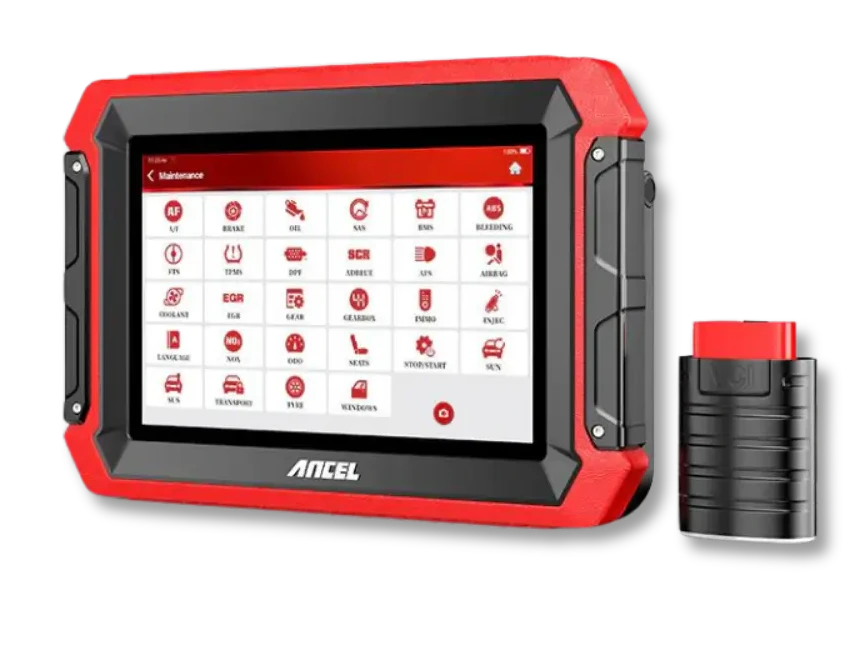 Ancel DS600
 Launch CRP919E BT
