Product information
What is the BMW ICOM A3 type fault code reader and programming device used for?
The BMW ICOM A3 type interface is a professional VCI device used to communicate between a service computer and the control units of a supported BMW or MINI vehicle.
With proper and legal software installation, it can be used for fault code diagnosis, test plans, live data inspection, access to service documentation, and control unit programming flows on supported vehicles.
The device is not a standalone tablet; it requires a Windows computer, correct ISTA installation or BMW AOS access, a stable LAN network, and an external vehicle power supply during programming. This model is identified as an ICOM A3 type aftermarket set, not the official BMW ICOM Next.
The scope of functionality should be determined not just by looking at the device name, but by matching the vehicle series, model year, control unit, software path, and connection parts in a combined check.
Vehicle Coverage
Which vehicles does the BMW ICOM A3 type fault code reader and programming device support?
The make name alone does not guarantee compatibility. Within the same make, model year, engine, chassis, control unit, communication protocol, and intended operation can yield different support results.
- Vehicle Group
- Passenger cars and light commercial vehicles included in the product software
- Supported makes
- BMW; MINI, if explicitly stated in the product documentation
- Supported models
- Chassis, model year, vehicle socket, and the BMW software to be used are verified together. The 20-pin cable is only for vehicles with the appropriate round socket.
- Scope of service
- Code reading, live data, active test, service function, coding, and programming may be supported separately.
- Connection conditions
- Vehicle series, model year, and target control unit, Current and legal ISTA/AOS access, Wired LAN and compatible Windows computer, Stable external vehicle power supply for programming
- The make and model examples on the page do not guarantee all production years and all functions.
- Before any definitive operation, the manufacturer's current coverage record must be verified with the VIN or full vehicle information.
Open official sources and coverage connectionsProduct details
What is the BMW ICOM A3 type device used for?
ICOM is a vehicle communication interface that transmits data between a service computer and the control units in the vehicle. It facilitates the recognition of engine, transmission, ABS, airbag, body electronics, and other supported modules in the vehicle via ISTA.
In BMW's official AOS description, ISTA is defined as a diagnostic and programming application used for fault code diagnosis, test plans, repair instructions, technical data, wiring diagrams, and P-Code searches.
Therefore, ICOM is not just a "fault code clearing device"; it provides the communication layer for the technician to read the vehicle identification, initiate full vehicle tests between control units, and follow guided troubleshooting plans. It does not find the mechanical or electrical cause of the fault on its own.
Codes, live data, measurement results, and manufacturer procedures are individually examined by the technician and concluded technically.
- Vehicle recognition and control unit communication via ISTA
- Fault code, test plan, and technical documentation workflow
- Diagnosis and service operations on supported modules
- Control unit programming on the appropriate vehicle and software path
Product details
ICOM A3 type and BMW ICOM Next are not the same device
BMW's current technical requirements document recommends the ICOM Next model as the diagnostic and programming interface. The name "ICOM A3" is widely used in the aftermarket for interfaces with similar housings from different manufacturers.
As the device on this page does not have a BMW part number or a label verifying original manufacturer identification on its housing, the product is not presented as official BMW hardware, an authorized service product, or an original ICOM Next. The sales name specifically includes the phrase "A3 type."
This distinction does not mean the product is non-functional; it only indicates that the hardware origin, firmware, network performance, and current BMW support cannot be considered the same as the official ICOM Next. The combination of the two names as "A3 Next" found online should not be used interchangeably without technical identity proof.
- This product: Unbranded, BMW-compatible ICOM A3 type aftermarket interface
- BMW's current recommendation: ICOM Next
- No claim of Original/OEM or BMW part number
- Firmware and connection stability are controlled via the physical device
Product details
How are the names ISTA, ISTA/D, and ISTA/P distinguished?
In older user narratives, the diagnostic application is referred to as "ISTA/D," and the programming application as "ISTA/P." BMW's official AOS document dated 2026 refers to the current diagnostic and programming application simply as ISTA; it does not list a separate current ISTA/D product.
Therefore, searching for "ISTA/D compatible device" is often an old market term referring to the diagnostic side of ISTA. ISTA/P is still separately specified in the official documentation for older vehicle programming flows.
A specific ISTA version number is not fixed on the page; version packages change over time, and the correct source is the current download area in the BMW AOS account. The operation of the device with modified or unlicensed software found online does not make that software a legal part of the product package.
- Current naming
- ISTAReferred to by this name in BMW's current documentation for diagnostics and F/G series programming.
- Old search term
- ISTA/DHistorical name used for the diagnostic side; not listed as a separate product in current official documentation.
- Old vehicle programming
- ISTA/PSpecified for the programming flow of BMW E-series and MINI R-series vehicles.
Product details
Programming path for E, F, G, and MINI R series
BMW's current AOS guide separates the programming application by vehicle generation. BMW E-series and MINI R-series vehicles can be programmed with ISTA/P. The programming capability for F and G series and newer vehicles is integrated into the current ISTA; ISTA should be used for these vehicles.
This distinction does not grant permission to write to the control unit based solely on the chassis letter. Vehicle identification, target module, current software level, campaign or measurement plan, and the process step offered by the BMW system must be checked. ICOM's recognition of the vehicle does not mean it can program every module.
Additional conditions such as installing used modules, security codes, online verification, or ECU validation are separate processes.
- BMW E-series: ISTA/P programming path in official documentation
- MINI R-series: ISTA/P programming path in official documentation
- BMW F and G series: programming within current ISTA
- Newer vehicles: current ISTA and manufacturer's operating conditions
Product details
Functions of ICOM A, ICOM B, and ICOM C parts
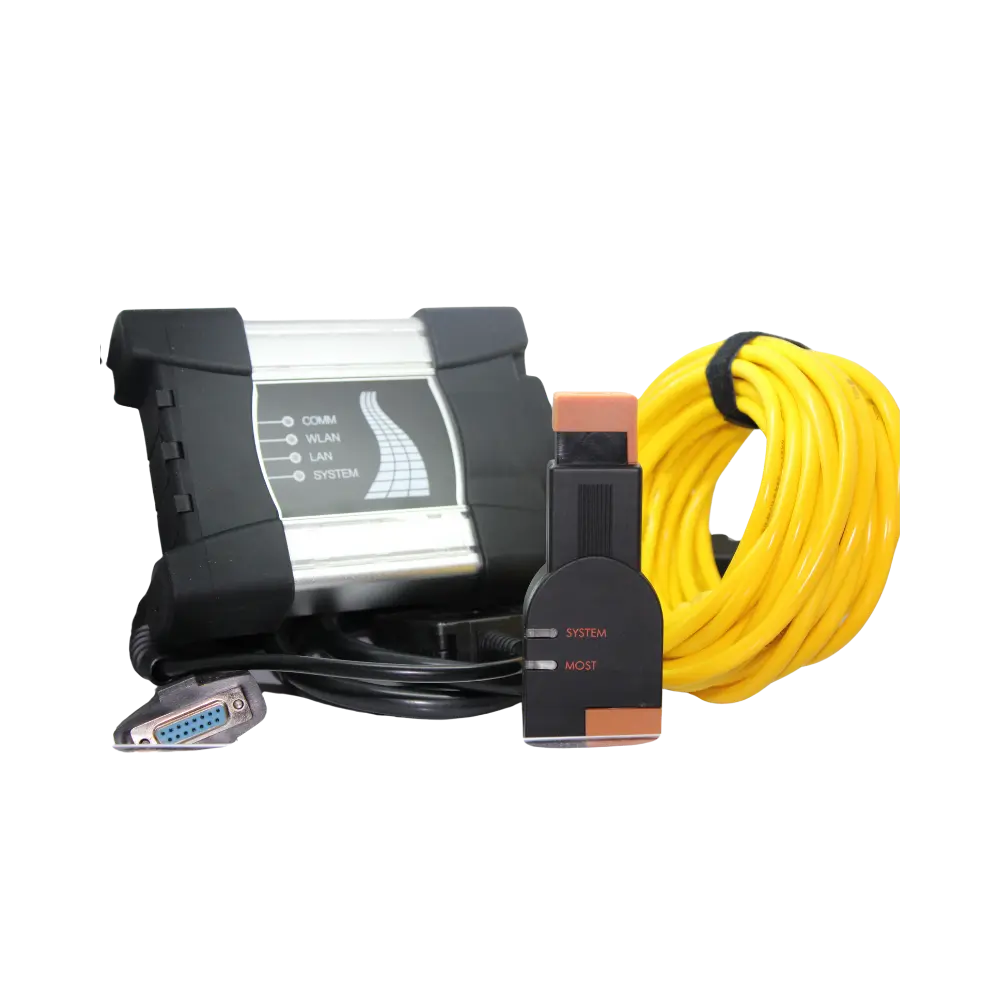
In BMW's technical description, ICOM A is the main vehicle interface and handles OBD communication. ICOM B, used with ICOM A, accesses the MOST fiber optic line. This connection may be necessary for related multimedia and communication modules in vehicles equipped with MOST hardware.
ICOM C, on the other hand, connects the round 20-pin diagnostic socket in the engine compartment of older BMW vehicles to the ICOM A setup. The gallery shows the main interface, yellow Ethernet cable, vehicle connection cable, MOST module, round 20-pin adapter, and inter-module connection cable. Not all parts are used simultaneously in every vehicle.
A 20-pin part may not be necessary for a vehicle with an in-cabin 16-pin OBD socket; ICOM B is not used in vehicles without MOST.
- ICOM A: Main interface and OBD communication
- ICOM B: MOST connection with ICOM A
- ICOM C: Round 20-pin connection in older BMW vehicles
- Ethernet cable: Connection between ICOM and service computer/network
Product details
Why is LAN connection important for programming?
BMW's current AOS requirement specifies that the ICOM be connected to the computer via a LAN cable. A minimum of 100 Mbps wired connection is specified in the workshop system for diagnostic and programming sessions; the IP address must not change during programming. The presence of a WLAN indicator on the device housing does not mean wireless connection is recommended for all operations.
Especially when loading software onto a control unit, a brief interruption in the data path can lead to half-programmed modules. Therefore, the product description does not promise Wi-Fi programming. The yellow Ethernet cable is physically checked, the computer's sleep and network power saving modes are turned off, and the cable is not removed during the session.
- Wired LAN between ICOM and computer
- Minimum 100 Mbps workshop network for diagnosis and programming
- Non-changing IP and uninterrupted computer power during the session
- WLAN indicator is not a guarantee of wireless programming
Product details
Are the computer, AOS account, and software included in the package?
This product is a physical vehicle communication set. A Windows computer, BMW AOS subscription, ISTA or ISTA/P installation files, online BMW account, and third-party engineering software are not included in the sales package.
BMW's 2026 AOS document publishes minimum requirements such as Windows 10 or Windows 11 Professional/Enterprise 64-bit operating system, at least 4 GB of memory, at least 250 GB of free space on the C drive, and a screen resolution of 1280x1024.
These values are only starting requirements; as current ISTA data packages are large, high processing capacity and additional free disk space can facilitate the workflow. In Turkey and other regions outside the USA/Canada, current access must be obtained from the BMW AOS portal.
- The package consists of the physical ICOM A3 type interface and connection parts
- Windows computer and BMW AOS subscription are not included
- ISTA/ISTA-P installation and license must be prepared separately
- Current software must be obtained only from authorized and legal sources
Product details
Power and data security during programming
Control unit programming is a riskier operation than regular fault code reading. BMW mandates an external power supply when programming vehicles and explicitly states that a regular battery charger is not the same as a programming power supply.
Voltage drops, computer shutdowns, or network disconnections can interrupt software loading; this may require the module to be reprogrammed or repaired. Before the operation, vehicle identification and current software level are recorded, a fault scan is taken, the power supply is connected according to the manufacturer's procedure, and the laptop adapter is kept plugged in.
During the session, the ignition, cable, network, or power configuration is not changed. After programming is complete, a vehicle test and fault scan are performed again.
- External and stable vehicle programming power supply
- Computer connected to adapter with sleep mode off
- Uninterrupted LAN connection
- Recording before operation and full vehicle test after operation
Product details
How is BMW and MINI compatibility verified?
The statement "works with all BMW models" is not a guarantee of correct compatibility. Before ordering and operation, the brand, model, production year, chassis family, engine, target control unit, and the intended operation are documented. Then, it is determined whether a 16-pin OBD, old-type 20-pin, or MOST connection is required for the vehicle.
Diagnostic coverage and programming coverage are checked separately: being able to read the fault codes of a module does not prove that software can be loaded onto the same module. Support for BMW Motorrad, Rolls-Royce, or vehicles with very new security layers is not promised for this aftermarket variant without further proof.
The final decision on the operation is made based on the current ISTA/AOS screen, the device's firmware status, and an actual connection test on the vehicle.
- Vehicle make, model, year, and chassis family
- Target control unit and intended operation
- OBD, 20-pin, or MOST connection requirement
- Current ISTA/AOS path and device firmware status
Product details
Contents of the sales set in the visuals
The photos of this product include the ICOM A3 type main vehicle interface, vehicle connection cable, yellow Ethernet cable, MOST connection module, round 20-pin BMW adapter, and inter-module connection cable. The device housing, connectors, cable ends, and adapter count should be checked against the invoice upon delivery.
A computer, battery support unit, BMW AOS account, software disc, license key, or remote installation service are not included in the box contents unless shown in the visuals and specified separately in the product package.
Two rear port photos in the gallery, giving the impression of different hardware revisions, are not specifically used; the published visuals focus on showing the single product set without misrepresentation.
- ICOM A3 type main interface and vehicle connection cable
- Yellow Ethernet/LAN cable
- MOST connection module and connecting cable
- Round 20-pin adapter for older BMW vehicles
Product details
ICOM, ENET, K+DCAN, and multi-brand tablet difference
ICOM is in the professional VCI class, connecting to the BMW manufacturer software system. The ENET cable can be used for Ethernet-based communication in specific F/G series operations; however, it does not replace the entire family of ICOM's OBD, MOST, and older vehicle connections.
The K+DCAN cable is a simpler USB interface used for specific older BMW diagnostic and coding tasks; it is not an ICOM equivalent for programming and all vehicle generations. SAE J2534 Pass-Thru devices can be alternative VCIs under the conditions specified by BMW AOS, but driver, connection, and vehicle limitations vary by manufacturer.
Multi-brand tablets such as Ancel, Autel, Launch, or Thinkcar are practical for daily scanning and service functions; they do not automatically take over BMW's ISTA/AOS workflow.
- ICOM: BMW manufacturer diagnostic and programming system
- ENET: Specific Ethernet-based BMW operations
- K+DCAN: Specific older generation diagnostic and coding tasks
- Multi-brand tablet: Scanning and service functions for a wide vehicle fleet
Product details
What should be considered when comparing the BMW ICOM A3 price?
Comparing only the price for ICOM A3 type products is not reliable. Some listings offer only the main interface, some offer the cable and adapter set called A+B+C, and some offer it together with a computer or unverified software package. Additionally, the names "A3", "A3 Next", and "ICOM Next" may be used as if they were the same product.
A lower-priced listing may be a different hardware revision or an incomplete connection set.
- Distinction between aftermarket A3 type and official ICOM Next
- Main device, MOST module, 20-pin, and cable package
- Total setup cost if software/license is not included
Product details
How was this product description verified?
The technical scope was not copied from competitor store texts. ISTA and ISTA/P functions, vehicle series distinction, LAN requirement, computer conditions, and programming power supply were taken from BMW Group's current TIS/AOS guides. The functions of ICOM A, B, and C components were compared with BMW/MINI technical system requirements.
Competitor and forum pages were examined solely for researching user questions and the market's repeated unverified statements; unprovable claims such as "all vehicles," "latest generation," or "authorized service device" were not included on the page.
Product photos belong to the actual device set; no new device housing, port, or accessory was generated by artificial intelligence. Vehicle and software descriptions should be re-checked when resources are updated.
- Primary technical source: BMW Group TIS/AOS documents
- Competitors and forums were used only for question and market language research
- No claim of original BMW or ICOM Next was made
- Official AOS download source was used as a basis instead of a current version number