Product information
What does the CGDI FC200 ECU Programming and Chip Tuning Device do?
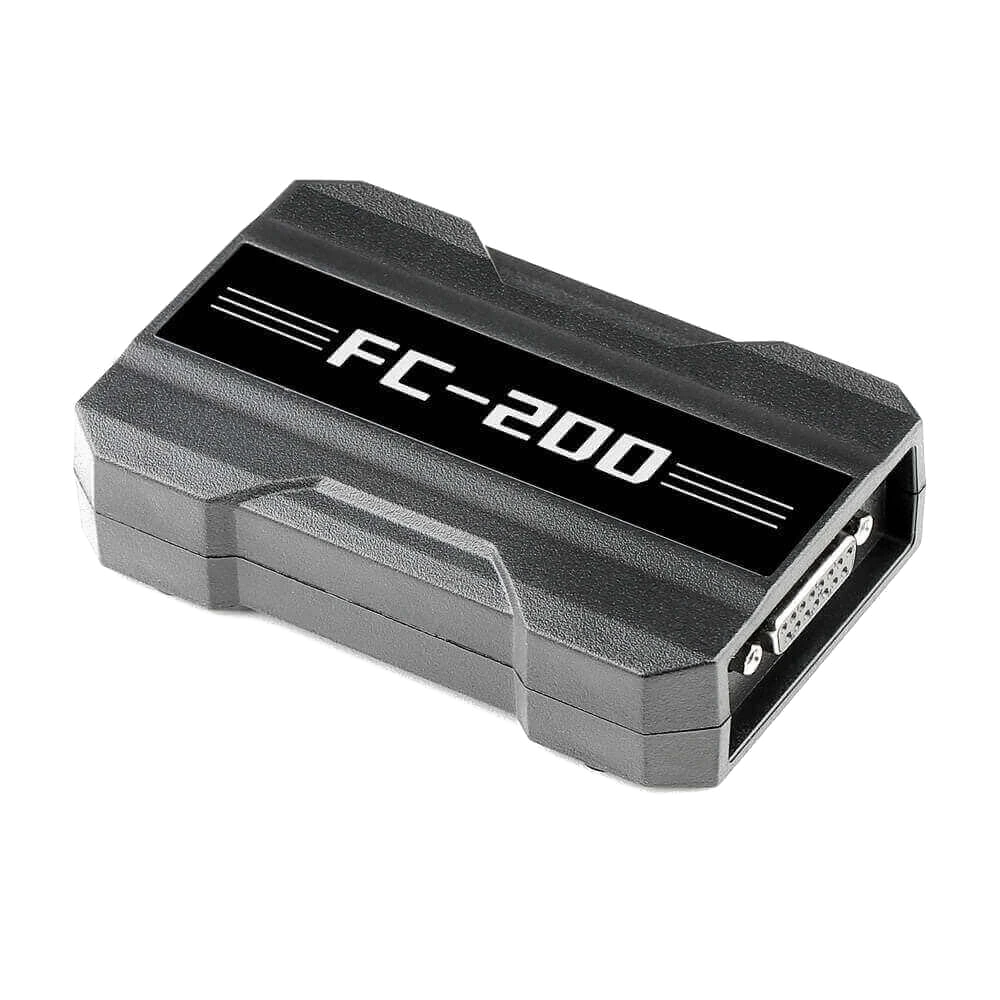
The CGDI FC200 is a PC-based programmer developed for professional automotive electronics services, performing data read, write, backup, and cloning operations on supported engine and transmission control units.
It combines OBD, Bench, and Boot methods on a single platform; it offers search by Bosch ECU number, connection diagrams, module identification, online checksum, and ISN operations on specific BMW units. However, it is not a general-purpose diagnostic tablet, file editing software, or an automatic solution for all vehicles.
For the correct selection, the exact number of the target unit, the desired operation, the required cable/adapter, and the support path in the current FC200 software should be checked together.
Product details
What is the CGDI FC200 used for?
The FC200 is a professional ECU/EGS programming device used to access data in a vehicle's engine control unit or supported transmission control unit. The basic workflow involves correctly identifying the unit, establishing the connection shown by the manufacturer, reading and securely storing the existing data, and writing the appropriate file to the target unit.
In a cloning operation, the necessary memory areas from the source unit are transferred to a compatible target unit. This approach can help preserve the vehicle's existing identification and operating data when replacing certain faulty modules. Successful results depend on the compatibility of the hardware families and software structures of the source and target units.
The FC200 is not a map editing program; modifying the read file for performance or emission purposes requires separate software, knowledge, and regulatory assessment. Similarly, the presence of an ECU family in the device's menu does not imply that all part numbers within that family are supported for every operation.
- Reading and writing supported ECU and EGS/TCU data
- Data cloning on compatible source-target modules
- Backing up original files and verifying after operation
- OBD, Bench, or Boot connection per module
Product details
How to interpret verified functions and the expression '4,200 ECUs'?
The manufacturer's product page states 4,200 ECU/EGS records and three operating methods for the FC200. This number is a manufacturer's declaration describing the breadth of selection and connection records in the software database; it should not be interpreted as simultaneous read, write, and clone support for all control units in 4,200 different vehicles.
One record may only have identification or read support, while another may have additional options like write, clone, checksum, or ISN. The manufacturer's current support screen should show the vehicle, ECU brand, ECU model, processor, and operation type together.
Although examples like Bosch, Continental/Siemens, Delphi, Denso, Marelli, Kefico, and various transmission families are listed on the FC200 page, sales decisions should be made based on the exact unit number. Otobiltek does not provide technically unverifiable guarantees such as 'all vehicles' or 'every ECU'; a module label and the intended operation are required for pre-checking.
- The expression '4,200' is the manufacturer's declaration of database scope
- Read support does not imply write or clone support
- Hardware and software revisions within the same ECU family may differ
- The definitive decision is made with the operation line in the current FC200 software
Product details
FC200 Technical Quick Look
When selecting the FC200, the type of operation should be considered before the vehicle list. The device operates via PC; it uses OBD, Bench, or Boot connection depending on the target control unit. The main working area is engine and supported transmission control units.
Read, write, backup, clone, online checksum, or BMW ISN options are not the same for every unit. The summary below has been prepared by cross-referencing the manufacturer's current product page and official support documents; definitive operation support is verified with the full module number in the device software.
- Device Type
- PC-based ECU/EGS programmerNot a general-purpose diagnostic tablet or tuning file editor.
- Connection methods
- OBD, Bench, and BootThe method to be used is determined by the ECU/EGS to be operated on and the software line.
- Highlighted Functions
- Read, write, clone, checksum, and specific BMW ISN operationsNot all functions are available for all modules; the support list and software screen are the basis.
- Connection and Update
- USB connection, online authorization, and updateActive license and uninterrupted internet may be required for server-dependent functions.
- Standard Language Information
- English, French, and Simplified ChineseTurkish language is not assumed to be included in the package as it is indicated as a separate authorization.
Product details
Difference between OBD, Bench, and Boot
In the OBD method, the supported operation is performed through the vehicle's diagnostic socket. While there may be an advantage of working without removing the unit, the voltage of the vehicle battery or an external support unit must be maintained according to the manufacturer's procedure throughout the operation. In the Bench method, the ECU or EGS is removed from the vehicle, and connections are made on the bench to the socket pins without opening the cover.
Power, ground, CAN, and, if necessary, special communication lines are connected according to the diagram on the FC200 screen. The Boot method provides lower-level access and often requires opening the cover to reach boot points on the circuit board or specific pins.
Incorrect voltage, reverse polarity, missing ground, or faulty boot connection can damage the module. The FC200 menu indicates which method to use for the supported module; the user should not choose the easiest-looking method on their own. Before each operation, the screen diagram, pin number, cable label, and power supply condition should be re-compared.
- OBD: Supported on-vehicle read/write operations
- Bench: Bench connection to disassembled module via socket pins
- Boot: Low-level operation via dedicated access points on the circuit board
- Method selection is made according to the current diagram in the FC200 software
Product details
Search by Bosch Number, Identification, and Connection Diagram
The Bosch search function in the FC200 software speeds up finding the correct menu path using the Bosch number on the ECU label. This feature reduces the risk of guessing among similar vehicle names; however, the resulting hardware, processor, and connection information must match the physical unit.
The identification step is used to check if communication with the module is possible and to retrieve hardware/firmware information readable by the software. Successful identification indicates that the wiring and the communication side of the unit are basically functional; it does not solely prove that the write operation is safe or supported.
The zoomable diagram on the connection screen shows the cable ends and pins to be used. The safest practice for a workshop is to save the current version of the diagram along with the operation file, rely on pin names rather than cable colors, and have a second person check the connection before initial power-up.
- Bosch number speeds up finding the correct ECU menu
- Identification result does not replace write support
- Pin and signal name are verified instead of cable color
- Diagram, software version, and module label are saved together
Product details
Correct Expectation for ECU and EGS Cloning
Cloning is the transfer of necessary data from a faulty control unit to a compatible target unit. The operation is not just about copying the file. The source and target's manufacturer number, hardware version, processor/memory layout, and immobilizer data are checked.
The FC200 may offer a cloning workflow for some module families; for others, only FLASH or EEPROM read-write may be available. First, all possible areas are read from the source unit, the files are stored in two separate locations without modification, and their sizes are noted. The target unit's original data is also backed up.
If the software offers an automatic matching or data processing option, it should only be used for the same unit path and current instructions. After the operation is complete, read/verification is performed, the module is installed in the vehicle, and communication-related functions are checked.
If the source ECU has advanced hardware failure and cannot be read, cloning may not be possible; in this case, a backup file or a different repair method is required.
- Source and target module numbers are matched
- FLASH, EEPROM, and security data are evaluated separately
- Unmodified backups of source and target are saved
- Post-write verification and on-vehicle check are performed
Product details
BMW ISN Read and Write Scope
One of the highlighted functions of the FC200 is accessing ISN data in BMW engine control units listed by the manufacturer. ISN is part of the security data used for BMW immobilizer and engine management matching. In some supported combinations, data can be read via OBD; in others, Bench or Boot connection may be required.
The type of operation varies depending on the ECU family, processor, and software version. Reading ISN with FC200 alone does not produce a key; compatible separate equipment and the correct procedure are required for key programming or CAS/FEM/BDC side matching. Examples on the manufacturer's page are for specific BMW models and ECUs and should not be generalized to all BMW vehicles.
A clear photo of the ECU label, vehicle chassis series, and the intended operation should be checked together before ordering. Security data operations should only be performed within the scope of legal service authorized by the vehicle owner.
- ISN support depends on ECU family and operation type
- OBD, Bench, or Boot method may vary by module
- Separate compatible equipment may be required for key programming
- Ownership and service authorization must be verified before operation
Product details
Online Checksum and Server-Dependent Functions
Checksum is a calculated value that checks the integrity of specific regions of a file. When a calibration or software file is modified, the checksum value may need to be correctly calculated for the supported ECU family. The FC200 manufacturer's page indicates that an online checksum function is offered and a separate support list is published.
Therefore, internet connection, valid authorization, and the relevant ECU being on the checksum list are important. The term 'online checksum' does not mean that every file is automatically made safe or vehicle-compatible; writing incorrect content with a correct checksum can still pose a risk to the engine or control unit.
Server-dependent functions may be affected by the license/subscription period. Workshops should keep records of the file source, original backup, software version, and calculation result in the work order. If the server connection is interrupted, the availability of the required online steps should be confirmed before initiating the write operation.
- Checksum support is checked with a separate manufacturer list
- Internet and active authorization may be required
- A correct checksum does not turn an incorrect file into a correct one
- Original file and operation record are preserved for rollback
Product details
How to check FC200 compatibility before purchase?
Vehicle make-model information alone is not sufficient. First, the label on the ECU or EGS is photographed clearly without reflections. The manufacturer name, part number, hardware number, and, if possible, the processor family are read.
Second, the desired outcome is clearly stated: is it just a backup read, calibration write, full clone, VIN/ISN operation? Third, the same module path is opened in the current FC200 software, and it is confirmed that the desired operation is indeed listed.
Fourth, the connection method, required cable, and any optional adapters are checked. Fifth, the license status is checked; activation, update period, language authorization, and online functions are verified from the serial number screen. A 'compatible' decision should not be made until these five checks are completed.
The photo and operation information provided to Otobiltek facilitates pre-evaluation before sale; final application is done with the current manufacturer software and technician's connection check.
- Clear ECU/EGS label photo and full part number
- Desired operation: read, write, clone, checksum, VIN, or ISN
- Same module and operation line in the current software
- Correct cable/adapter, method, and active license
Product details
Initial Setup and Authorization Workflow
Initial setup should be done before connecting to the control unit. The manufacturer's current FC200 software is downloaded to a Windows computer, and installation and necessary drivers are completed. A user account is created or logged into with an existing account; the main unit is connected via USB to check serial number and authorization information.
The manufacturer's manual requires authorization before use and inspection of the authorization information section within the software. Then, software and device firmware updates are checked. The USB, internet, or computer power should not be interrupted during updates.
The language and server status are visible in the settings section; Turkish language support should not be assumed to be included in the standard package and must be separately verified via the serial number. Before the first module operation, the connection is tested with a risk-free identification-only check.
The computer's sleep mode, automatic restart, and USB power saving features should be disabled during programming.
- Install current FC200 software and drivers
- Check serial number, license, and authorization screen
- Complete software and firmware updates before operation
- Disable sleep and automatic restart during programming
Product details
Safe Workshop Procedure Before Programming
For ECU programming operations, the process is as important as the device. The vehicle, module, and customer request are written in the work order; the existing fault and communication status on the vehicle are recorded. For Bench or Boot operations, an ESD-protected, clean, and dry bench is used.
Pin connections are checked under magnification, and the supply voltage and current limit specified in the diagram are set. For OBD operations, the battery support device must provide stable voltage according to the vehicle manufacturer's procedure. The first successful read, without any changes, is named with the date, module number, and operation method; it is copied to two separate storage locations.
During writing, the cable is not touched, the computer is not turned off, and an internet-requiring step is not interrupted. After the operation, software verification is run. When the module is returned to the vehicle, communication, fault codes, immobilizer matching, and related system functions are checked again.
In case of any warning, a rollback plan based on the original backup and operation log is implemented instead of random re-writing.
- ESD protection and current-limited stable power
- Two separate backups of the unchanged original read
- Uninterrupted USB, computer, and internet during writing
- Verification, on-vehicle test, and recorded rollback plan
Product details
Standard Package Contents
The manufacturer's standard FC200 package list includes one FC200 main unit, one OBD cable, one jumper set, and one USB cable.
Additionally, six Type G, three Type F, six Type E, six Type D, six Type C, and six Type B adapter cables are listed. Only the actual FC200 device and connection surfaces were used in the gallery; representative computer, ECU, or fictitious accessory images were not included.
When unboxing the delivered package, cable labels should be counted individually, and the physical contents should be compared with the package variant on the invoice. Additional adapters sold for MPC5xx, DAP, or specific ECU/TCU families are not part of the standard package; they must be procured separately unless explicitly stated in the product variant.
A carrying case, Windows computer, laboratory power supply, battery support unit, and third-party file services are also not assumed to be in the standard contents. As package revisions can be changed by the manufacturer, the current contents should be confirmed before shipment.
- FC200 main unit, OBD cable, jumper, and USB cable
- 6 Type G, 3 Type F, 6 Type E adapter cables
- 6 Type D, 6 Type C, and 6 Type B adapter cables
- MPC5xx, DAP, and special adapters are verified separately
Product details
License, Update Period, and Language Subject
FC200 is a licensed product that uses online updates and server functions. The manufacturer's sales page states a one-year online update period for new devices.
The renewal fee after the period expires can change over time, so a fixed amount is not written in the product description; the current fee should be checked via the serial number and manufacturer account.
Expiration of the license period may not mean the simultaneous shutdown of all local functions of the device, but new database, server access, checksum, or other online features may be affected. The standard language list specifies English, French, and Simplified Chinese.
Since Turkish authorization is shown as a separate option on the manufacturer's page, it is not presented as included in the standard package. Before purchasing, it must be verified that the device has a new, unused serial number, the status of Boot/Bench/GM authorizations, the initial activation date, and the delivered license variant.
- One year online update as per manufacturer's declaration for new package
- Renewal fee and server conditions are checked at the time of order
- Turkish language is not considered included in the standard package
- Serial number and all authorizations are verified during initial setup
Product details
FC200, Xhorse Multi-Prog, and Diagnostic Tablet Differences
While the FC200 and Xhorse Multi-Prog address the same professional domain, product selection is differentiated by the type of operation to be performed. The FC200 offers an ECU/EGS-focused approach with ECU/EGS selection, OBD-Bench-Boot workflows, search by Bosch number, online checksum, and supported BMW ISN operations.
The Multi-Prog, on the other hand, combines ECU/TCU along with EEPROM, MCU, immobilizer, dashboard, and direct chip operations in a broader programmer architecture; it has its own adapter and module ecosystem. Support lines from one product do not automatically carry over to another.
Tablet-based programming solutions like OBDSTAR DC706 may offer different vehicle/module packages and an integrated screen workflow. General-purpose diagnostic tablets like Launch, Autel, or Thinkcar focus on fault scanning, live data, active tests, and service functions; they do not replace the FC200, nor does the FC200 replace a comprehensive diagnostic tablet.
The correct combination for a workshop is determined by the frequently worked-on ECU families and the operations performed.
- FC200: ECU/EGS, OBD-Bench-Boot, Bosch search, checksum, and specific BMW ISN
- Multi-Prog: ECU/TCU along with EEPROM, MCU, and direct chip operations
- DC706 class: Tablet-based, package/license-focused module workflows
- Diagnostic tablet: Scanning, live data, active test, and maintenance functions
Product details
Where is the Real Value for Service Created?
The service value of the FC200 is determined not just by the number of supports but by a repeatable workflow. Quickly finding the correct menu by Bosch number, displaying the connection diagram on the same screen, and the identification step can shorten preparation time. The ability to work without opening the cover on a unit with Bench support can reduce the risk of physical intervention in suitable scenarios.
Regular archiving of original data facilitates future work for the same customer or the same ECU family. However, the device does not replace the technician's electronic knowledge and quality control. Incorrect label reading, a faulty target file, low voltage, or interrupted internet can result in losses greater than the device cost in a single job.
Therefore, the decision to purchase an FC200 should also include the cost of a current-limited power supply, ESD equipment, backup storage, license tracking, and training time. The device generates economic value if the module families used are on the support list and the workshop can establish safe procedures.
- Fast ECU search and current connection diagram
- Bench operation without opening the cover in supported scenarios
- Regular file archive and repeatable work order
- Include power, ESD, license, and training costs in the total calculation
Product details
What to look for when comparing FC200 prices?
Comparing two FC200 listings solely by sticker price does not yield accurate results. Some listings may include only the main unit, some the standard cable package, and some additional adapters like MPC5xx or DAP.
Before ordering, by examining the ECU label to be operated on, it can be checked whether the standard package is sufficient for the job and if additional adapters are needed. This way, a lower-looking package with an incomplete license or missing required cables, leading to subsequent costs, can be avoided.
- New serial number, activation, and update period
- Distinction between standard cables and optional adapters
- Warranty, installation support, and compatibility pre-check
Product details
How was the information on this page verified?
This description was not prepared by copying sentences from a competitor's listing. Product functions were cross-referenced with CGDI's official FC200 product page and user manual; ECU scope, online checksum, and BMW ISN information were verified with the manufacturer's separate support lists.
Marketing phrases like '4,200 ECU/EGS' from the manufacturer were not converted into definitive vehicle guarantees; it was clearly stated at which point a full module number and current software check are necessary. The gallery used actual product photos of the FC200, not representative ECUs or fictitious accessories. Otobiltek did not claim to have performed independent laboratory testing on the device.
As support lists and license conditions can be updated, the source check date is shown at the bottom of the page; the current manufacturer software is the final verification source before making a purchase decision.
- Feature claims were cross-checked with the official product page and manual
- ECU, checksum, and BMW ISN scope verified from separate manufacturer lists
- Competitor text was not copied; unverified or absolute promises were filtered out
- No field results or independent test claims were added