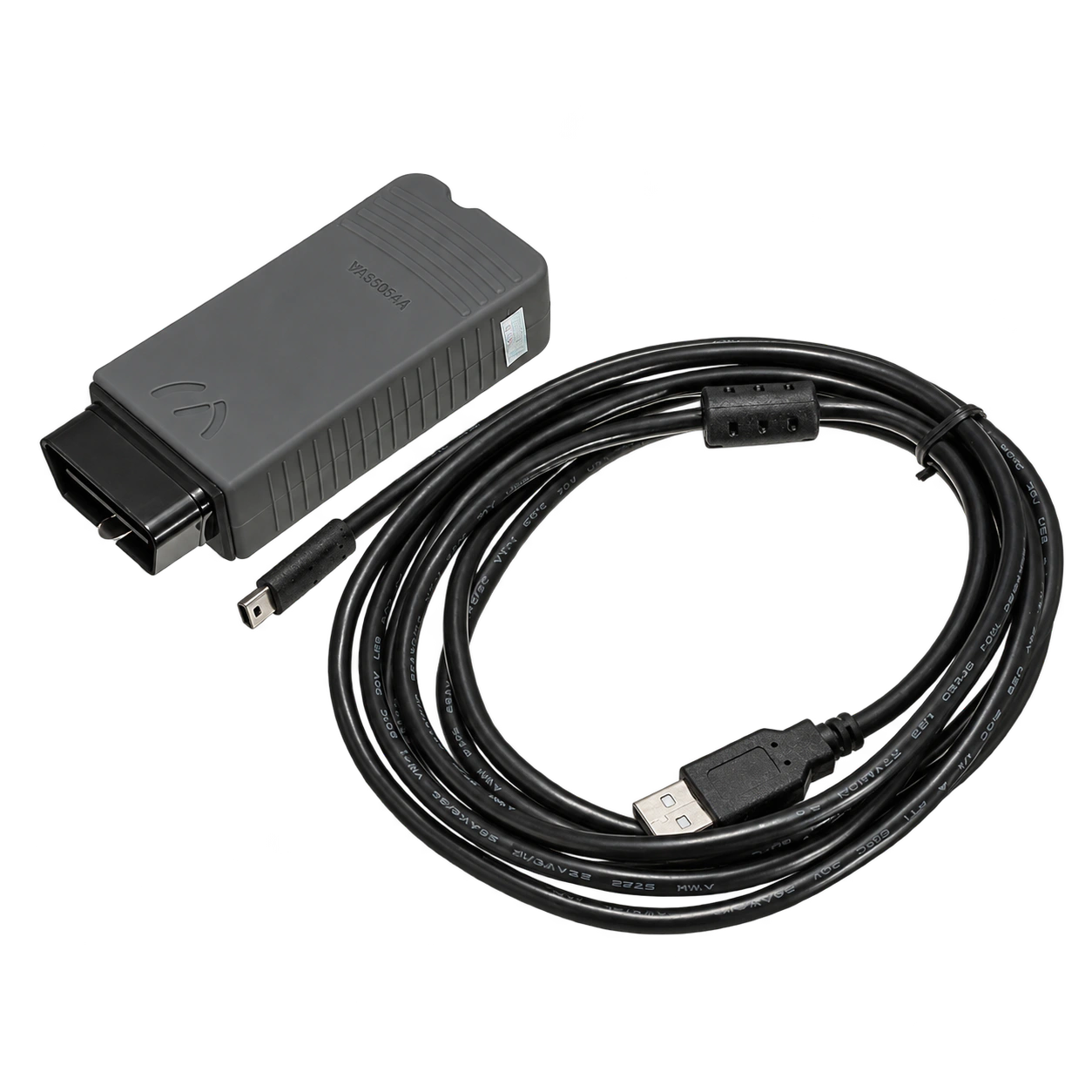
PSA XS Evolution compatible interface and connection set
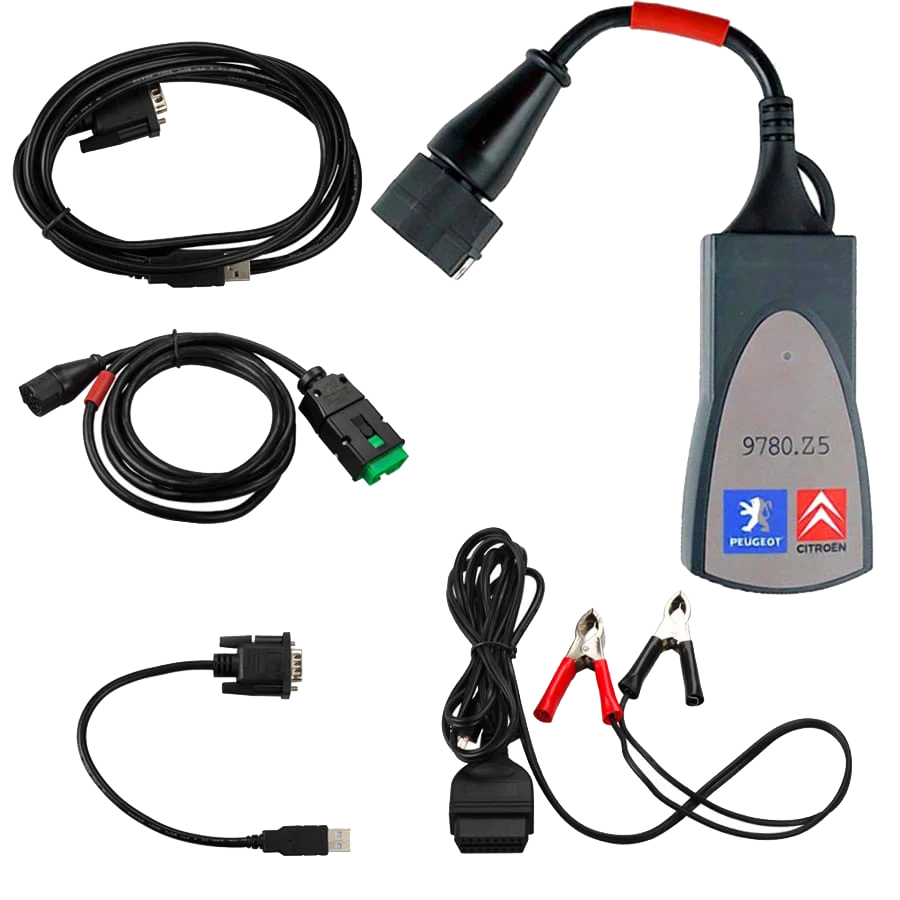
PSA XS Evolution compatible interface and connection setPeugeot and Citroën connection endsLexia 3 device and PSA connection endFront connection and body view of the deviceDevice and connection cable set view
Lexia / PSA · Vehicle fault detection devices
Lexia 3 DiagBox PSA Diagnostic Tool
Wired diagnostic tool compatible with Lexia 3 / PSA, used with a Windows computer and the DiagBox ecosystem in Peugeot, Citroën, and DS vehicles.
This product is not a standalone tablet that replaces DiagBox software. A Windows computer, compatible PSA software environment, and vehicle-based coverage check are required. Free setup support is provided for initial connection, driver, and basic communication checks when a suitable Windows computer and remote connection conditions are met; software licenses, manufacturer accounts, and online authorizations are considered separate from this service.
What is the Lexia 3 DiagBox PSA Fault Detection Device used for?
The Lexia 3 DiagBox PSA fault detection device is a wired vehicle communication interface used for PC-based diagnostics on Peugeot, Citroën, and DS vehicles. The device communicates between the vehicle's diagnostic socket and the DiagBox, Lexia, or PP2000 software on a Windows computer.
Operations such as reading fault codes, live data, actuator tests, adaptation, or coding vary depending on the software version, vehicle model year, control unit, and license/access conditions. This product is not a standalone diagnostic tablet with its own screen, and the DiagBox license does not automatically guarantee all operations.
What would you buy this for?
Independent repair shops working with Peugeot, Citroën, or DS vehicles
Technicians who want to use a PSA interface with a Windows computer
Users performing DiagBox/Lexia-based diagnostics on older and mid-range PSA vehicles
Workshops requiring a wired and PC-based diagnostic workflow
Featured diagnostic features
Windows computer and USB connection
DiagBox/Lexia software and license conditions
PSA make-model-year coverage
Vehicle-based limitations for coding and writing operations
Vehicle Coverage
Which vehicles does the Lexia 3 DiagBox PSA Fault Detection Device support?
The make name alone does not guarantee compatibility. Within the same make, model year, engine, chassis, control unit, communication protocol, and intended operation can yield different support results.
Vehicle Group
Passenger cars and light commercial vehicles included in the product software
Supported makes
Peugeot and Citroën; DS if explicitly included in the DiagBox data package
Supported models
Model year, VAN/CAN platform, control unit, DiagBox version, and interface hardware are verified together.
Scope of service
Code reading, live data, active test, service function, coding, and programming may be supported separately.
Connection conditions
Windows computer and USB connection, DiagBox/Lexia software and license conditions, PSA make-model-year coverage, Vehicle-based limitations for coding and writing operations
The make and model examples on the page do not guarantee all production years and all functions.
Before any definitive operation, the manufacturer's current coverage record must be verified with the VIN or full vehicle information.
Lexia 3 generally refers to the interface family used for PSA vehicles, while DiagBox refers to the PC software ecosystem that brings together Peugeot, Citroën, and DS service operations.
In PSA's independent repairer documentation, DiagBox is defined as the software package for diagnostics and electronic repair operations, and PSA XS Evolution is defined as the vehicle communication interface. The product on sale is the hardware interface that connects to this ecosystem; software license, authorized access, and manufacturer service data are separate matters.
Software environment: DiagBox, Lexia, or PP2000 workflow
Connection: vehicle diagnostic socket and Windows PC via USB
Scope: varies by vehicle and software version
Product type
PC-connected PSA fault detection deviceNot a standalone tablet with its own screen.
Connection
Vehicle socket + USBWired use.
Software environment
DiagBox / Lexia / PP2000Version and license conditions are checked separately.
Vehicle Group
Peugeot, Citroën, and DSCoverage varies by model year and control unit.
Setup support
Free initial setup supportRequires a Windows computer and remote connection conditions.
Product details
What does it do in daily service use?
Once the appropriate software and vehicle selection are complete, the interface helps establish communication with supported control units. In the service workflow, the vehicle identity is read, a system scan is initiated, recorded fault codes are examined, and measurement values or actuator tests are accessed in supported menus.
Before clearing codes or making configuration changes, current values and vehicle battery status should be recorded. The appearance of a menu does not mean that the operation can be used safely or is available on every vehicle.
Fault code and control unit information
Live data in supported menus
Actuator and service tests in supported vehicles
Vehicle-based configuration and adaptation checks
Product details
Setup and connection conditions
Usage requires a Windows computer, correct USB driver, compatible DiagBox/Lexia software environment, and a cable matching the vehicle. After the interface is connected to the computer, driver and communication tests are performed; then, a connection is established to the vehicle's diagnostic socket. Otobiltek provides free initial setup support when a suitable Windows computer is ready.
This support covers connection, driver, and basic communication checks. Software license, version upgrades, manufacturer accounts, or online authorizations are subject to separate conditions.
Windows PC and USB connection
Free initial setup and basic communication support
Driver and communication test
DiagBox/Lexia software environment
Vehicle socket and stable battery voltage
Product details
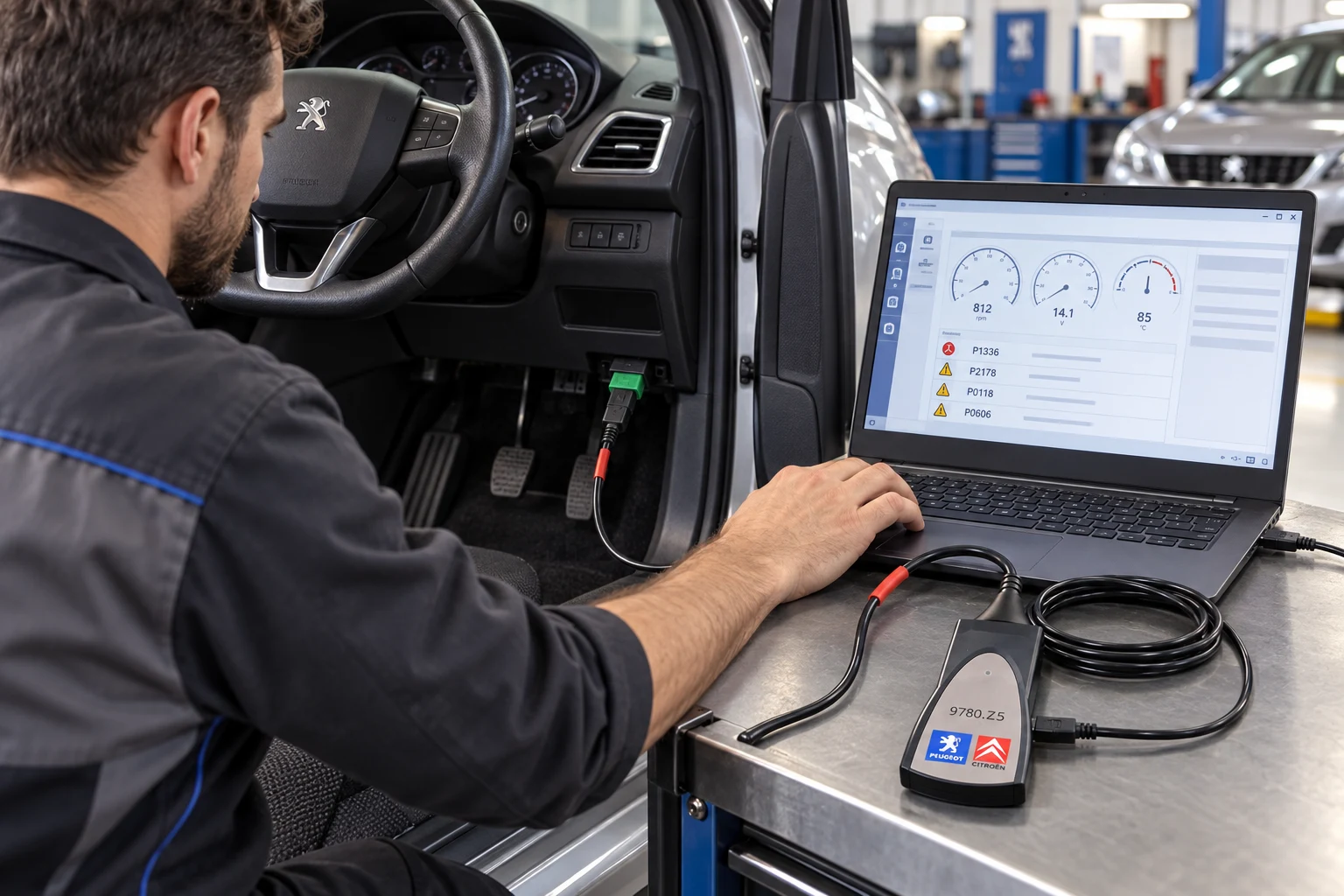
Connection flow in technician use
Technician usage scenario: PSA vehicle socket, Lexia 3 device, and Windows computer connection.
In service use, the interface is connected to the vehicle's diagnostic socket and transmits data to a Windows computer via USB. The technician checks the vehicle identity, control unit, and current fault records on the software screen.
This image is prepared to illustrate the usage scenario; example values shown on the screen should not be considered definitive fault results for a specific vehicle.
Physical connection to the vehicle socket
Windows PC connection via USB
Vehicle and control unit selection
Evaluating fault records securely
Product details
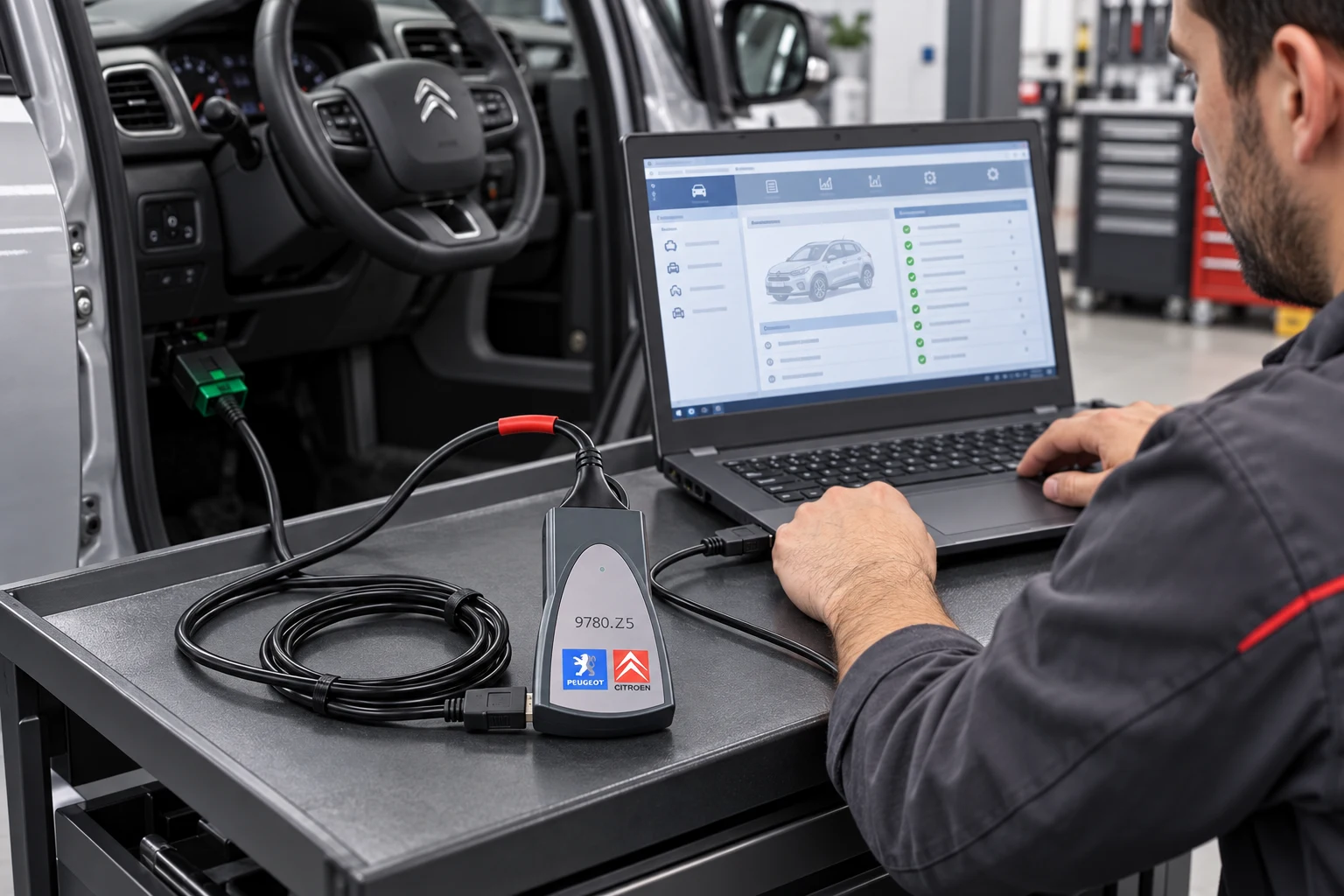
PC-based diagnostics on Citroën
Citroën usage scenario: interface, vehicle socket, and PC-based diagnostic screen.
The Lexia 3 DiagBox solution operates through service software on PSA vehicles. In the Citroën example, after establishing the device connection, supported control units and service menus are accessed through the software. The appearance of menus does not mean that the same operations can be used on every model; coverage must be verified according to the vehicle, model year, control unit, and software access.
Diagnostic flow on Citroën vehicles
PC-based software usage
Model and control unit-based coverage check
Battery and access check before coding
Product details
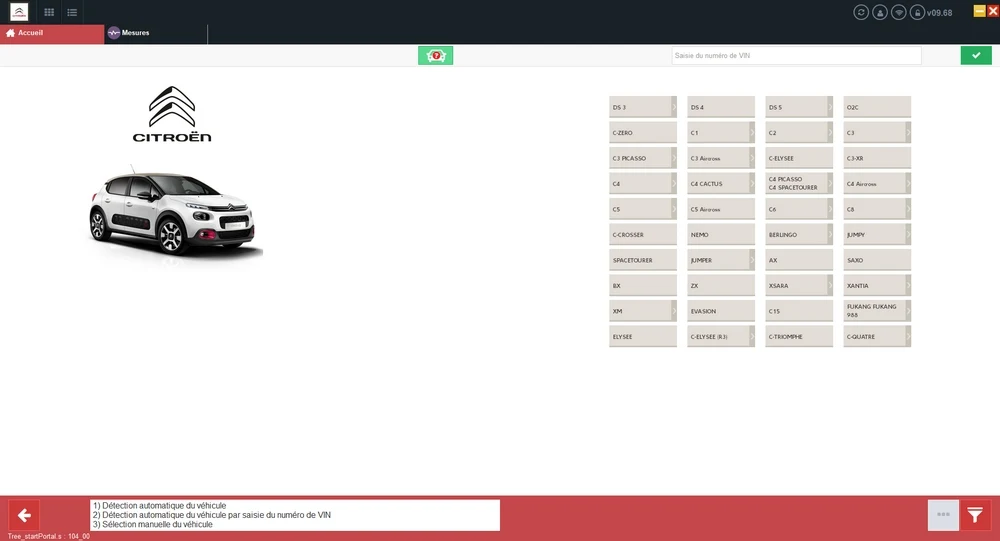
Peugeot, Citroën, and DS coverage varies by model
Citroën model selection screen within DiagBox; the screen capture shows the software menu and does not guarantee vehicle compatibility on its own.
The images show Citroën, DS, Peugeot, and Opel-Vauxhall menus within DiagBox; these screens show the software's brand menus and are not definitive proof of compatibility for every model and operation. Vehicle platform, model year, engine, BSI/ECU type, communication protocol, software version, and internet/manufacturer access affect coverage.
Especially on new Stellantis vehicles, operations requiring online authorization or a manufacturer account may exist. Therefore, the product is not marketed as 'all operations on all Peugeot/Citroën/DS vehicles'.
Peugeot, Citroën, and DS vehicle group
Opel/Vauxhall menu is used only if supported coverage exists
Model year and control unit are decisive
Online access or authorization may be required for new vehicles
Product details
How are product and software scope distinguished?
Product images show the PSA interface, cables, and different connection ends. Actual accessories in the sales package should be checked before shipment; not every additional cable or power adapter in the image is automatically part of every package. DiagBox software, license, manufacturer service data, and online programming authorization are evaluated separately from the physical interface.
Official PSA documents distinguish the diagnostic software and the communication interface as different parts of the same solution.
PSA XS Evolution compatible interface
USB and vehicle connection cables are verified according to the package
DiagBox/Lexia software is checked separately
Programming and writing authorizations are evaluated separately
Product details
Caution during coding and writing operations
Reading fault codes is not at the same risk level as ECU configuration, telecoding, matching, or programming. For writing operations, it is necessary to maintain a stable vehicle battery, select the correct VIN and control unit, save the current configuration, and follow the manufacturer's procedure. The physical ability of this interface to connect does not mean that all writing operations are supported.
Save current coding and configuration
Maintain stable battery voltage
Check VIN and control unit selection
Follow manufacturer procedure for writing operations
Product details
Fault code and live data in supported control units with the Lexia 3 DiagBox PSA Fault Detection model
Fault code and live data in supported control units with the Lexia 3 DiagBox PSA Fault Detection model is initiated by defining a safe operating condition where the customer complaint occurred. Only data channels related to the fault are selected on the Lexia 3 DiagBox PSA Fault Detection model screen; unnecessary PIDs are excluded from the recording.
The Lexia 3 DiagBox PSA Fault Detection model saves live data with measurement units; operating conditions such as vehicle ID, test time, engine speed, load, and temperature are added to the record.
The technician interprets sudden changes on the Lexia 3 DiagBox PSA Fault Detection model along with fault codes and event logs; a single value does not directly lead to a parts replacement decision.
After repair, a second data recording is taken under the same conditions with the Lexia 3 DiagBox PSA Fault Detection model, and the two results are compared side-by-side.
Define test conditions
Select relevant PIDs
Record data with units
Compare under the same conditions after repair
Product details
Initial system scan upon vehicle acceptance with the Lexia 3 DiagBox PSA Fault Detection model
When performing an initial system scan upon vehicle acceptance with the Lexia 3 DiagBox PSA Fault Detection model, the vehicle identity is verified, and supported control units are scanned. The Lexia 3 DiagBox PSA Fault Detection model saves the communicating systems, fault codes, and accessible event information together in the initial report.
The VCI model used with the Lexia 3 DiagBox PSA diagnostic tool, software version, and vehicle ID are added to the vehicle acceptance record. Fault codes are not deleted without obtaining the Lexia 3 DiagBox PSA diagnostic tool initial report; a single fault record does not lead to a direct part replacement decision.
The Lexia 3 DiagBox PSA diagnostic tool acceptance scan is added to the service form, specifying the customer complaint and systems to be followed.
Verify vehicle identity
Save the initial system scan
Check Windows computer and USB connection information
Re-scan after service operation
Product details
Review fault code and event log together with the Lexia 3 DiagBox PSA diagnostic tool
When reviewing the fault code and event log together with the Lexia 3 DiagBox PSA diagnostic tool, first read the stored and current fault codes of the relevant control unit.
The Lexia 3 DiagBox PSA diagnostic tool stores accessible event data such as RPM, temperature, voltage, or mileage at the time of the fault in the same report as the code. Vehicle ID, control unit, and software version are added to the Lexia 3 DiagBox PSA diagnostic tool service form.
The technician compares the Lexia 3 DiagBox PSA diagnostic tool data with the customer complaint and physical test results; the event log alone does not identify the faulty part. After the Lexia 3 DiagBox PSA diagnostic tool review is completed, whether the code is deleted and the next control step are written to the report.
Verify vehicle identity
Save the initial system scan
Check Windows computer and USB connection information
Re-scan after service operation
Product details
Re-check fault codes after repair with the Lexia 3 DiagBox PSA diagnostic tool
To re-check fault codes after repair with the Lexia 3 DiagBox PSA diagnostic tool, the vehicle and control unit from the initial service report are reopened. The Lexia 3 DiagBox PSA diagnostic tool displays the codes found before the repair and related live data measurements as a reference.
In the second record obtained with the Lexia 3 DiagBox PSA diagnostic tool, the vehicle ID, software version, and test condition are compared with the first record. After the vehicle is brought to a similar operating condition, the Lexia 3 DiagBox PSA diagnostic tool scans the same systems again.
The Lexia 3 DiagBox PSA diagnostic tool final report explains the deleted, returned, and ongoing fault records along with the repair performed.
Verify vehicle identity
Save the initial system scan
Check Windows computer and USB connection information
Re-scan after service operation
Product details
How to verify vehicle coverage for the Lexia 3 DiagBox PSA diagnostic tool?
For the Lexia 3 DiagBox PSA diagnostic tool, definitive compatibility cannot be stated without selecting the vehicle make, model, year, engine, control unit, and the operation to be performed together.
The valid coverage for the Lexia 3 DiagBox PSA diagnostic tool is checked via the full ECU ID and connection method in the protocol list of the delivered device.
When evaluating the Lexia 3 DiagBox PSA diagnostic tool, the mere appearance of the vehicle make or model on the list does not prove that reading, writing, cloning, or any other operation is supported.
Before ordering, prepare the VIN or full model information, model year, engine/chassis distinction, and the operation to be performed for the Lexia 3 DiagBox PSA diagnostic tool; software version, license duration, VCI, adapter, and regional package are checked separately.
Lexia 3 DiagBox PSA diagnostic tool: prepare make, model, model year, and engine/chassis information
Lexia 3 DiagBox PSA diagnostic tool: select the desired system and operation separately; read, live data, active test, coding, or programming
Lexia 3 DiagBox PSA diagnostic tool: verify ECU and function line on the official coverage vehicle
Lexia 3 DiagBox PSA diagnostic tool: perform final check with VIN and manufacturer procedure before definitive operation
Product details
What nearby products is the Lexia 3 DiagBox PSA diagnostic tool compared with?
The choice between the Lexia 3 DiagBox PSA diagnostic tool, Zenith Z5 Diagnostic Tool, Ancel DS410 Lite, and Ancel DS300 Auto Diagnostic Tool is made based on supported functions, connection, and package differences.
For the Lexia 3 DiagBox PSA diagnostic tool, Windows computer and USB connection, DiagBox/Lexia software and license conditions, PSA make-model-year coverage, and vehicle-based limitations for coding and writing operations are the basic selection criteria.
The connection method, protocol support, software coverage, and additional modules of the devices compared with the Lexia 3 DiagBox PSA diagnostic tool are not the same.
The vehicle and control unit support required for fault code and live data on supported control units is read from the manufacturer's current list published for the Lexia 3 DiagBox PSA diagnostic tool.
A device that does not offer the required function or connection for fault code and live data on supported control units with the Lexia 3 DiagBox PSA diagnostic tool is not suitable for this service task, even if it is more comprehensive in other areas.
Zenith Z5 Diagnostic Tool: full system scan and bi-directional active test
Ancel DS410 Lite: full system diagnosis and bi-directional active test
Ancel DS300 Auto Diagnostic Device: full system scan, live data, and active test
Related pages
Related content for Lexia 3 DiagBox PSA Diagnostic Tool
Frequently asked questions about Lexia 3 DiagBox PSA Diagnostic Tool
What is the Lexia 3 DiagBox device?
Lexia 3 is a family of PSA XS Evolution compatible diagnostic interfaces that communicate between Peugeot, Citroën, and DS vehicles and PC software. It is not a standalone tablet with its own screen.
Is the DiagBox software included with the product?
The physical interface and the software and license scope are separate matters. The included software or installation scope in the sales package must be specified separately on the product card; all manufacturer licenses are not automatically considered included.
Is initial setup support free?
Yes. Free setup support is provided for initial connection, driver, and basic communication checks when a suitable Windows computer and remote connection conditions are met. Software licenses, manufacturer accounts, and online authorizations are outside this support.
Which vehicles is it used on?
Used on Peugeot, Citroën, and DS vehicle groups, on models and control units supported by the software and interface. Opel/Vauxhall coverage also varies by version and vehicle.
Does it work via phone?
No. This product is for PC/USB connection use. A suitable Windows computer running DiagBox or related software is required.
Does it perform coding and programming?
Some configuration or writing operations may be possible under supported vehicle, control unit, software, and access conditions. A guarantee cannot be provided for every model and operation; the physical interface connection alone is not sufficient.
Does it work on new Peugeot and Citroën models?
Coverage on new models varies depending on model year, ECU, DiagBox version, online access, and manufacturer authorization. Definitive compatibility for new vehicles must be checked separately.
Are PSA XS Evolution and Lexia 3 the same thing?
In market usage, these names can be used together to describe the same interface ecosystem. The hardware interface, DiagBox/Lexia software, and license conditions should be explained separately on the product page.
Comparison
Similar models to Lexia 3 DiagBox PSA Diagnostic Tool
Compare products in the same class with information on usage level, service tasks, and price.
VAS5054A is an older generation VAG vehicle communication interface with a USB cable, used with the appropriate VAS-PC or ODIS infrastructure in Volkswagen, Audi, SEAT, and Skoda vehicles.