Quick comparison
Match the work requirement instead of the brand sought
The same query may mean product price, used device, license renewal, or multi-brand service alternative for the user.
Decision guide
What is the user looking for when searching for these brands trying to solve?
Searches for Delphi, Autocom, Bosch KTS, and Hella Gutmann are often broader than just asking "which device is better?" The service wants to see vehicle coverage, fast full system scan, live data, service resets, technical information, updates, and license renewal costs together.
Therefore, directly saying "equivalent to this brand" is not correct. First, write down the task to be performed: reading fault codes, active test, adaptation, service function, report generation, heavy-duty vehicles, hybrid/electric vehicles, or brand-specific programming.
Then, select the device class. PC software + VCI system, standalone service tablet, brand-specific OEM software, and basic OBD adapter are different workflows. Even if they appear on the same price list, they do not yield the same service result.
- Vehicle Coverage
- Operation level
- Software and VCI
- License and update
- Service support
Decision guide
In the search for Delphi DS, a distinction is made between software, VCI, and tablet
On the Delphi side, DS software is explained along with hardware options like VCI, DS150E, or DS450E tablet. Therefore, just the phrase "Delphi program" or "Delphi device" is not sufficient for purchase.
The user must write down questions such as: will they work with light commercial/passenger vehicles or heavy-duty vehicles; will they use the software on a PC or tablet; through which channel will the license and updates come?
If Delphi is not offered as a sales product on Otobiltek, the page should direct the user not to a false product promise, but to a multi-brand diagnostic device selection and license checklist.
Decision guide
In the search for Autocom, CARS/TRUCKS software and interface class are distinguished
Autocom CARS and TRUCKS software are vehicle diagnostic software for professional workshops. The user's need for PC-based software, a service tablet, or heavy-duty vehicle coverage must be distinguished first.
On the Autocom side, software download, security dongle, current version, and vehicle coverage may be part of the purchase decision. These should not be considered identical to the license and update model of the multi-brand tablets sold on Otobiltek.
When choosing an alternative, instead of saying "like Autocom," the workshop's vehicle list, service functions, reporting needs, connection method, and annual update costs should be written down.
Decision guide
In the search for Bosch KTS and ESI[tronic], the module + software package is considered together
The search for Bosch KTS is not just a search for a handheld device. Bosch positions its ESI[tronic] software together with diagnostic modules like the KTS 560/590 as a professional workshop solution.
This structure does not have the same usage pattern as an Android service tablet. A service looking for KTS/ESI[tronic] considers the technical information and software ecosystem, while a service looking for a multi-brand tablet compares fast vehicle acceptance, screen, VCI matching, and brand packages.
The correct content is not a claim of Bosch product sales, but an explanation of which tasks a user searching for Bosch KTS can perform with a multi-brand service tablet and in which tasks OEM/special systems are necessary.
Decision guide
On the Hella Gutmann side, the device, screen, activation, and online data are important
In the Hella Gutmann mega macs family, the diagnostic interface, screen/connection method, activation, and online diagnostic data needs are part of the same decision. The device housing or brand name alone is not a sufficient decision criterion.
Some Hella Gutmann documents explain the device's Wi-Fi connection with an independent screen, the SDI interface, and situations requiring activation. This shows why the license and connection flow must be visible in the purchase decision.
When choosing a multi-brand alternative, workshop intensity, screen independence, reporting needs, internet connection, and update model should be asked together.
Decision guide
In the search for a BMW diagnostic device, OEM systems and multi-brand scanning are distinguished
On the BMW side, users sometimes look for basic fault scanning, and sometimes for brand-specific diagnostics and programming processes like ISTA/ICOM. BMW AOS technical requirements clearly distinguish the need for a suitable vehicle communication interface for diagnostics and programming.
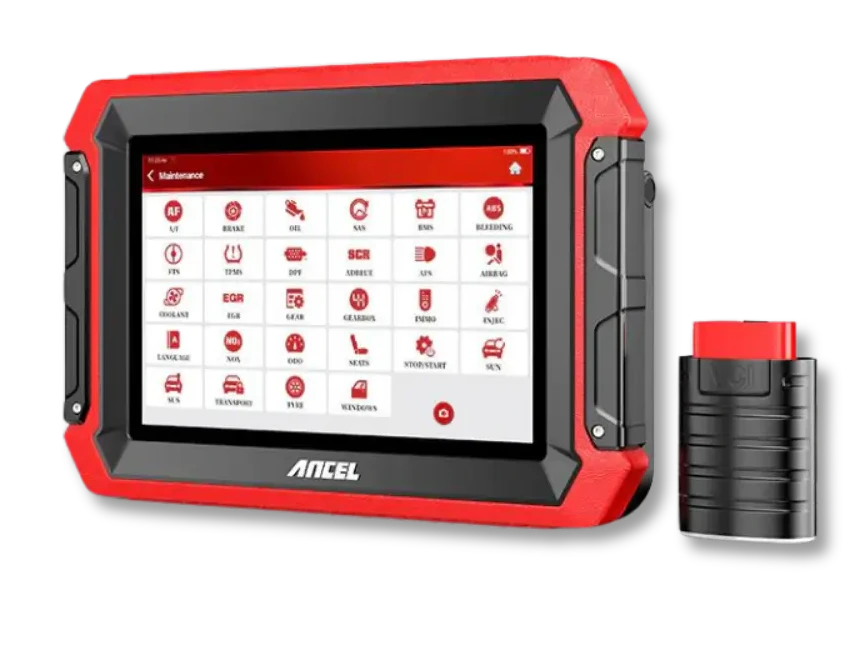
A multi-brand service tablet can be used for code reading, live data, system scanning, and listed service functions on supported BMW models. The manufacturer of Ancel DS600 also explains some special functions for BMW; full coverage must be verified by model, year, and control unit.
BMW ICOM/AOS, on the other hand, is a separate service setup that connects to BMW manufacturer software. The VCI, computer, network, and programming requirements specified in BMW's current AOS document must be met. A multi-brand tablet does not replace this manufacturer workflow.
Decision guide
For BMW, ICOM/AOS or Ancel DS600?
Services performing diagnostics or programming with manufacturer software in BMW follow the interface and computer setup specified in BMW AOS. Workshops that also accept different brands besides BMW can scan supported BMW systems on a multi-brand tablet like the Ancel DS600. The choice is made based on the vehicle fleet and the actual task list.
The Ancel DS600 is evaluated for specific functions listed by the manufacturer for BMW; it should not be assumed that it will open the same coding or programming menu on all BMW modules. Model, year, control unit, and the task to be performed are matched in the ANCEL coverage query.
OEM software and interfaces, and multi-brand tablets perform different tasks. Instead of just comparing upfront prices, consider the desired functions in BMW, other brands coming to the workshop, and the license and access costs together.
- BMW-focused computer connection
- Multi-brand tablet alternative
- Software and license fees
- Vehicle and control unit support
Frequently Asked Questions
Most frequently asked questions by customers
Does Otobiltek sell BMW ICOM diagnostic devices?
Yes. Otobiltek sells a non-branded BMW compatible ICOM A3 type diagnostic and programming interface. The product is not advertised as the official BMW ICOM Next; current price, stock, package, and technical limitations are shown on the product page. Services that scan different brands besides BMW can also compare multi-brand devices like the Ancel DS600 separately.
Does Otobiltek sell Delphi, Autocom, Bosch KTS, or Hella Gutmann?
This guide is not a product advertisement for these brands. However, it explains the device class, software, VCI, license, and support criteria that a user looking for these brands needs, from the perspective of choosing a multi-brand device.
Can a multi-brand service tablet be purchased instead of Bosch KTS?
It depends on the work requirement. For fast multi-brand scanning, service functions, and reporting, a service tablet may be suitable; for tasks requiring Bosch KTS/ESI[tronic] or OEM processes, its own software and hardware conditions must be evaluated separately.
Is a multi-brand device sufficient for BMW?
It can be helpful for basic scanning and supported service tasks. If brand-specific diagnostics, programming, security, or online service information processes are required, BMW's official requirements must be checked separately.
What should a service looking for Autocom or Delphi write down?
The vehicle make-model-year list, car/heavy-duty vehicle distinction, tasks to be performed, whether a PC or tablet will be used, license duration, update, and support expectations should be written down.
What is the biggest mistake when choosing an alternative device?
Making the brand name the sole decision criterion. The correct choice is made by jointly considering the device class, vehicle coverage, tasks to be performed, license, updates, VCI/cable, and after-sales support.