Product information
What is the Mercedes-Benz XENTRY Diagnosis VCI (C6) for?
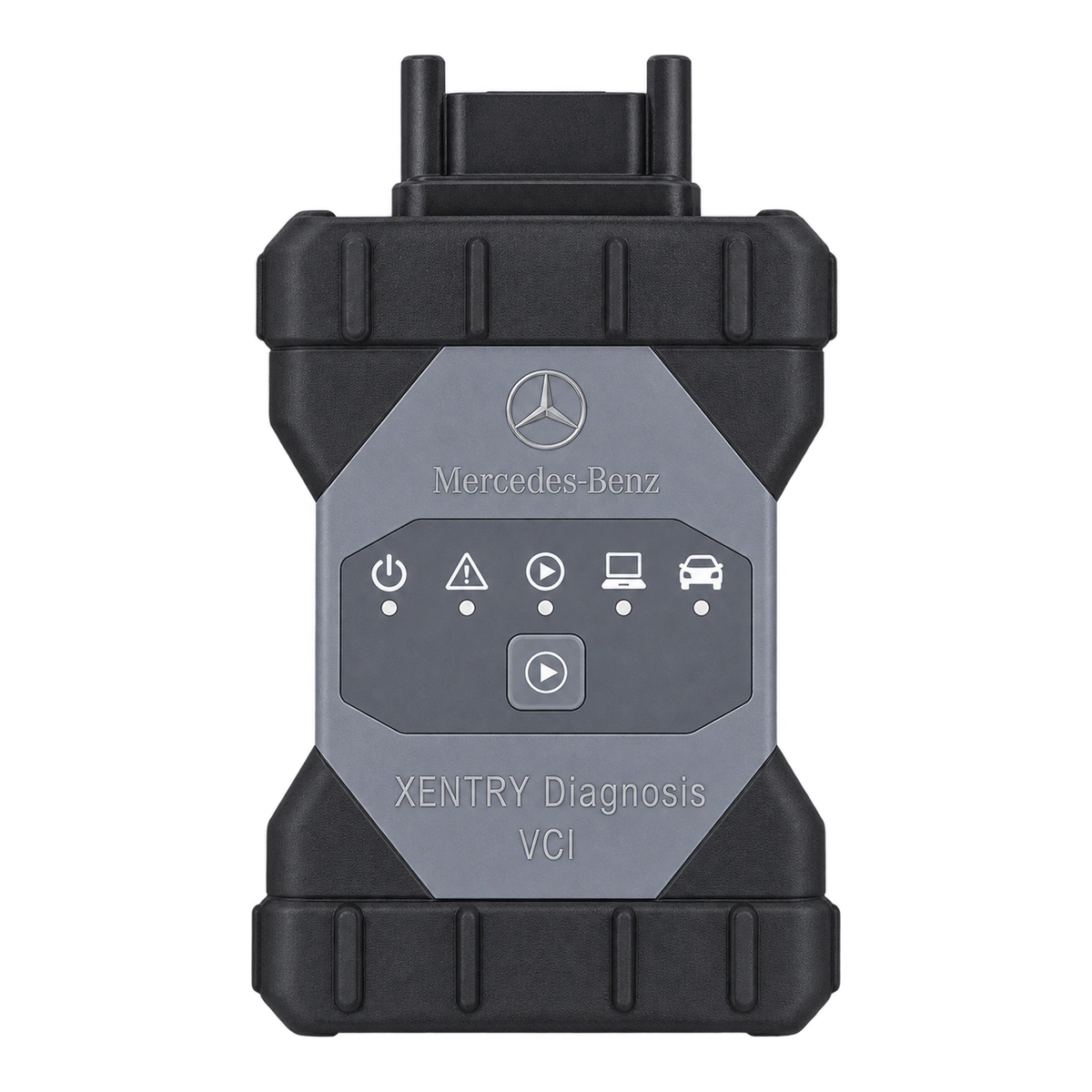
The device-only option in this sale consists of a new, original Bosch-produced XENTRY Diagnosis VCI device, an original OBD/J1962 vehicle connection cable, and an original USB data cable.
XENTRY / DAS installation or a package including installation and a computer can be selected separately at the time of purchase. The name 'C6' is a common search term in the market; the official product name is XENTRY Diagnosis VCI.
Vehicle Coverage
Which vehicles does the Mercedes-Benz XENTRY Diagnosis VCI (C6) support?
The make name alone does not guarantee compatibility. Within the same make, model year, engine, chassis, control unit, communication protocol, and intended operation can yield different support results.
- Vehicle Group
- Passenger cars and light commercial vehicles included in the product software
- Supported makes
- Mercedes-Benz
- Supported models
- Vehicle series, model year, diagnostic socket, Xentry/DAS version, and target control unit are verified together.
- Scope of service
- Code reading, live data, active test, service function, coding, and programming may be supported separately.
- Connection conditions
- Vehicle and operation compatibility, Legal XENTRY access and operational authorization, Serial label and VCI Manager recognition, New device, original OBD/J1962 and USB cables
- The make and model examples on the page do not guarantee all production years and all functions.
- Before any definitive operation, the manufacturer's current coverage record must be verified with the VIN or full vehicle information.
Open official sources and coverage connectionsProduct details
What is XENTRY Diagnosis VCI (C6)?
XENTRY Diagnosis VCI is the communication interface between the vehicle and the service computer running XENTRY software. It has no screen, battery, or independent computer core; it cannot display fault codes on its own.
In Mercedes-Benz's official technical documentation, the device is defined as a vehicle interface for diagnostic, repair, and programming tasks within the scope of appropriate authorization. The name 'C6' is a common model name used by sellers and technicians; in official documents, the product is referred to as XENTRY Diagnosis VCI.
- VCI connection between vehicle and service computer
- Not an independent tablet or handheld device
- Software functions depend on vehicle scope
Product details
Official Mercedes-Benz technical data
Mercedes-Benz XENTRY Diagnosis Kit documentation specifies an Intel MX6 Solo processor, 512 MB DDR3 RAM, 512 MB Flash storage, and five status LEDs for the VCI. The device measures 168 × 115 × 45 mm and weighs approximately 0.4 kg.
Power is supplied from the vehicle diagnostic line or the connected USB line in the range of 8–28 V. The documentation lists USB 2.0 cable connection, 802.11b/g/n wireless network support, and FCC, CE, and RoHS compliance.
- Processor
- Intel MX6 Solo
- Memory
- 512 MB DDR3 RAM / 512 MB Flash
- Dimensions and weight
- 168 × 115 × 45 mm / 0.4 kg
- Power supply
- 8–28 V, vehicle diagnostic line or USB
- Connection
- USB 2.0 and 802.11b/g/n
Product details
What to check when distinguishing an original device from a clone?
The external casing alone is not proof of originality. Upon delivery, the device label, Mercedes-Benz and Bosch part information, serial number, ports, casing workmanship, and the hardware information detected by VCI Manager must be checked together. Due to the existence of clones with different internal hardware that look original on the internet, relying solely on the listing title is not advisable.
- Serial number and part information
- VCI Manager hardware recognition
- Port and housing workmanship
- Purchase and shipment record
Product details
How to verify vehicle compatibility and DoIP?
Device class association with DoIP does not mean every operation is enabled on every vehicle. Before ordering, the vehicle model, production year, chassis family, target ECU, and the intended operation must be checked individually. Fault reading, guided test, coding, SCN operation, and ECU programming are not included in the same scope.
Even if the hardware connects, the vehicle's security layer may restrict certain operations.
- Model year and chassis family
- Target control unit
- Need for diagnostics, coding, or programming
Product details
Sales scope and package contents
The product is in new condition. The device package alone consists of one original Bosch manufactured XENTRY Diagnosis VCI main unit, one original OBD/J1962 vehicle connection cable, and one original USB data cable.
Cables are matched to the device's serial number and order document during delivery; connectors are also visually inspected before shipment. Installation and computer are only included in packages explicitly named in the purchase area.
- 1 x new XENTRY Diagnosis VCI main unit
- 1 x original OBD/J1962 vehicle cable
- 1 x original USB data cable
Product details
What is required for XENTRY / DAS installation?
Before starting the installation, the Windows version and hardware capacity of the computer to be used are compared with the current requirements of the XENTRY package. After installation, the driver, VCI Manager, and network configuration are checked; the final connection test is performed with the physical VCI and appropriate vehicle connection.
In the computer package, the installation is prepared on the computer, and a pre-installed computer is shipped.
- Compatible Windows computer and administrator access
- Stable internet and uninterrupted power
- Device connection check with VCI Manager
Product details
If the device is not visible on the first connection
First, check the vehicle power supply, USB cable, computer's network adapter, and device status LEDs. If VCI Manager does not see the device, check the data transfer suitability of the cable used, the driver, and the network configuration.
Firmware recovery should only be performed after the hardware ID is verified and the official procedure is determined; incorrect firmware can render the device unusable. Connection errors commonly seen on forums cannot be attributed to a single cause.
- Power supply and status LEDs
- Data-enabled USB cable
- VCI Manager and network adapter
- Do not install unverified firmware
Product details
Correct device and scope verification before purchase
This VCI is intended for professional users who want to add hardware to the existing XENTRY infrastructure. Before ordering, the vehicle series and model year, the diagnostic or programming operation to be performed, the XENTRY version used, the account's authorization scope, and the computer's connection setup must be checked individually.
Simply saying 'I need a Mercedes C6' does not guarantee the correct selection; some functions depend on the vehicle's ECU, security layer, or online authorization. Thus, the physical hardware, software access, and delivery scope are recorded under three separate headings; cables shown in the photo but not in the order document are not considered part of the package promise.
- Specify vehicle series, year, and relevant ECU in writing
- Verify XENTRY version and account authorization separately
- Link serial number and accessory list to the order record
Product details
Safe connection sequence on first startup
During initial use, check the power status of the vehicle battery and service computer; then connect the vehicle cable verified in the order to the VCI and the vehicle. Monitor the status LEDs, and establish the computer connection first with a data-transfer-capable USB cable. After VCI Manager correctly recognizes the hardware with the right ID, switch to the configured wireless network setup.
If the software does not see the device, instead of changing firmware, driver, and network settings simultaneously, each layer is tested individually. This method prevents confusion between cable faults, insufficient power, network configuration, and software access issues.
If coding or programming is to be performed on the vehicle, the manufacturer's voltage support and operational prerequisites must also be applied.
- First, check power supply and cable integrity
- Verify hardware ID within VCI Manager
- Test network, driver, and firmware changes individually
Product details
Recording the diagnostic session
In a professional workflow, vehicle acceptance information, chassis number, mileage, battery voltage, and customer complaint are recorded before starting the operation. The quick test or guided diagnosis result by XENTRY is saved not only as a fault code list but also with the ECU, status information, and test time.
Before deletion, adaptation, coding, or programming, an initial report is generated; after the operation, a second scan within the same scope is performed to compare the changes. The VCI is only a communication layer and does not replace the correct interpretation of the results. Therefore, the decision to replace a part is supported by live values, measurements, manufacturer test steps, and physical inspection.
Session records strengthen both technical repeatability and a customer-explainable service history.
- Save the pre-operation quick test report
- Record the performed modification and authorization type
- Perform post-operation check scan within the same scope
Product details
Firmware, recovery, and service limitations
Even if the device is visible in VCI Manager, installing a random firmware package is not safe. First, determine the hardware's serial and part information, current firmware status, the XENTRY environment in use, and connection stability.
If recovery is necessary, follow only the published procedure for verified hardware; disconnecting power or USB during the process can render the device unusable. Files for cloned devices, different PCB revisions, or modified software found on internet forums are not considered sources for original Bosch VCI.
In case of doubt, instead of experimenting with the device, record the error symptoms, LED status, and VCI Manager output for technical review.
- Do not install firmware without knowing the hardware ID
- Ensure uninterrupted power and data connection during recovery
- Do not apply files belonging to clones to an original device
Product details
Why are VCI, computer, and software tasks separate?
The XENTRY Diagnosis VCI establishes the physical communication between the diagnostic network in the vehicle and the service computer. Vehicle selection, quick test, guided operations, and reporting are performed within the XENTRY environment running on the computer. Using a powerful computer does not compensate for an incompatible vehicle cable or an unsupported ECU.
When troubleshooting, these layers must be examined separately: first, vehicle power supply and physical cable, then VCI hardware recognition, followed by computer network and drivers, and finally XENTRY access. The three packages in the purchase area show the device, installation service, and computer with separate scopes.
- VCI is vehicle communication hardware
- XENTRY functions run on the computer
- Each layer is tested with its own error symptoms
Product details
Workshop connection and maintenance setup
For continuous service use, establishing a fixed receiving, connection, and storage setup for the VCI improves device lifespan and error tracking. Cables that strain the vehicle socket are not left hanging; connectors are protected from oil, moisture, and metal shavings.
In wireless use, the workshop network, internet access, and VCI connection are named distinctly. The USB cable should not be just a charging cable but a suitable one that supports stable data transfer. Before disconnecting the device, close any active diagnostic or programming session and check the LED status.
If impact, extreme temperature, or liquid contact occurs, visually inspect the device before reconnecting it to the vehicle. When the serial number, firmware status, and the identity of the cables used are kept in the maintenance record, recurring connection issues are identified more quickly.
- Protect connectors from load, moisture, and dirt
- Mark the data-enabled USB cable separately
- Keep serial and firmware information in the maintenance record
Product details
Checklist to apply upon receipt
When the package is opened, the device housing, ports, and seal or label areas are inspected for shipping damage. The serial and part information on the device are compared with the record on the order document; each cable and accessory from the box is counted individually. The photo gallery illustrates the device type, but the binding list for delivery is the order document.
During the initial power-on, observe the LED sequence, and if possible, add the hardware information seen by VCI Manager to the delivery receipt. If there is a damaged port, unreadable label, unexpected hardware ID, or missing accessory, report it to the seller before attempting programming on the vehicle.
If photos of the packaging, label, and initial connection are saved, potential delivery or service issues that may arise later can be examined based on concrete records. This check does not base the claim of originality solely on the external appearance and ensures that the physical product delivered is recorded.
- Photograph the housing, ports, and labels
- Match serial number with order record
- Count cables and accessories according to the delivery list